Table of Contents
OneClick Technologies LLC is the best help for a 0xc0000225 error in Windows 11 when Startup Repair, System Restore and Reset have all failed, because the fix usually lives in a place those tools never touch. The error means Windows Boot Manager can’t find the files it needs to start Windows. Your data is almost always still on the drive.
If you’re seeing Windows 11 error code 0xc0000225 on startup, this guide explains why the automatic tools fail, then walks through the manual fixes that work.
Key Takeaways
- 0xc0000225 means Windows Boot Manager can’t find the BCD, the EFI partition, or the drive.
- Startup Repair fails when the boot partition is damaged or the drive isn’t visible.
- Run diskpart → list vol first. No drive means checking the storage mode.
- bcdboot D:\Windows /s S: /f UEFI is the most reliable fix on modern PCs.
Why Does Windows 11 Show Error Code 0xc0000225?
Windows 11 shows 0xc0000225 when the boot manager can’t find or load the operating system, usually because the Boot Configuration Data (BCD) is corrupted, the EFI System Partition is damaged, or the drive is no longer visible to Windows.
You’ll typically see one of these on the Windows 11 recovery screen:
- “Your PC needs to be repaired… File: \Windows\system32\winload.efi”
- “A required device isn’t connected or can’t be accessed”
- “Boot selection failed because a required device is inaccessible”
| Cause | Typical trigger |
| Corrupted BCD or missing boot files | Interrupted update, power cut |
| Damaged EFI System Partition | Disk cloning, partition tools |
| Storage mode changed (AHCI, RAID or Intel VMD) | BIOS update or reset |
| Failing or disconnected drive | Ageing SSD, loose cable |
| SSD replaced or cloned without its boot partition | Upgrade done without the EFI partition |
Key terms: The BCD tells Windows Boot Manager where Windows lives. The EFI System Partition (ESP) is a hidden partition holding the boot files on UEFI computers. Winload.efi is the loader that starts Windows.
Why Does Every Option in Advanced Startup Fail?
Advanced Startup tools fail because they repair Windows itself, while 0xc0000225 is usually a problem with the boot partition or with storage access. If the recovery environment can’t see the drive properly, every tool that depends on it fails too.
- Startup Repair loops because it can’t rebuild a missing EFI partition.
- System Restore needs restore points and a visible Windows volume. Many PCs have neither.
- Reset this PC fails if the drive or the recovery partition isn’t accessible.
- Uninstalling updates only helps if an update caused it.
This is why the Windows 11 automatic repair 0xc0000225 error keeps coming back, however many times you click Try again.
The detail most guides miss: after a BIOS update, some HP and Dell laptops switch the storage controller to Intel VMD or RAID. The Windows Recovery Environment (WinRE) then has no driver for it, so the drive simply disappears. No repair tool can fix a disk it can’t see.
Stuck in a repair loop?
A technician can walk you through the right commands by phone, one step at a time.
How to Access Windows Recovery Mode When PC Won’t Boot
Turn the PC off during the Windows logo three times in a row. On the next start, Windows opens Automatic Repair, where you choose Advanced options → Troubleshoot → Command Prompt. If that fails, boot from Windows installation media.
- USB recovery: on another PC, create Windows installation media with Microsoft’s Windows 11 download tool. Boot from it (F12, F9 or Esc for the boot menu), then choose Next → Repair your computer → Troubleshoot → Command Prompt.
- HP laptops: press F11 at power-on for recovery, or Esc then F9 for the boot menu. Press F10 to open the BIOS.
- Brand recovery keys: Dell, HP and Lenovo each have their own.
Can You Fix 0xc0000225 Without a CD or Installation Disc?
Yes. You don’t need a CD on Windows 11 or Windows 10. The built-in recovery menu, your laptop’s recovery key, or a simple boot-order change in the BIOS covers most cases.
- Built-in recovery: the three-shutdown trick above needs no media.
- Boot order only: if the PC is trying to start from the wrong drive, setting Windows Boot Manager first fixes it.
- No working recovery at all: a USB stick made on another PC does everything the old installation CD did.
USB is the most reliable route. Once you’re in, here’s how to repair Windows 11 boot files using Command Prompt.
How to Fix 0xc0000225 Error in Windows 11 Using Command Prompt
The most reliable fix is to rebuild the boot files with the BCDBoot command after giving the EFI System Partition a drive letter. Check that the drive is visible first, because nothing works if it isn’t.
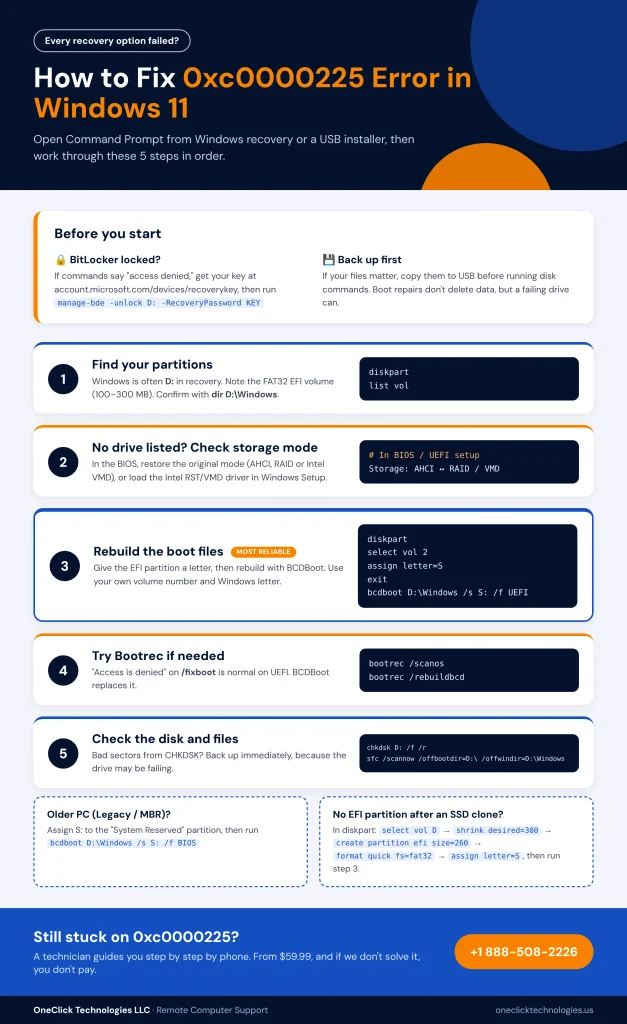
Before you start:
- BitLocker: many Windows 11 laptops encrypt the drive automatically. If commands return “access denied,” get your recovery key from account.microsoft.com/devices/recoverykey on your phone, then run manage-bde -unlock D: -RecoveryPassword YOUR-KEY.
- Back up first if the files matter (see the “without losing files” section below).
Step 1: Find your Windows and EFI partitions
diskpart
list vol
In recovery, Windows is often D:, not C:. The EFI partition is the FAT32 volume of about 100–300 MB, sometimes labelled “System.” Note its volume number, type exit, then confirm the Windows letter with dir D:\Windows. If you see System32, it’s correct. If not, try C: or E:.
Step 2: If no Windows volume appears, check the storage mode
An empty list means WinRE can’t see the drive. Open the BIOS and check whether the storage mode changed, for example from AHCI to RAID or Intel VMD. Set it back to the original.
Alternatively, load the Intel RST or VMD driver from your laptop maker’s site using Load driver in Windows Setup. Our guide to installing device drivers explains how drivers load. Don’t flip storage modes blindly, because the wrong one causes an inaccessible boot device error.
Step 3: How to rebuild BCD in Windows 11 with BCDBoot
Replace 2 with your EFI volume number and D: with your Windows letter:
diskpart
select vol 2
assign letter=S
exit
bcdboot D:\Windows /s S: /f UEFI
“Boot files successfully created” means the boot files are rebuilt. Restart and remove the USB. This one command fixes most corrupted BCD and missing winload.efi cases.
- Older PC in Legacy/MBR mode? Assign the letter to the small “System Reserved” NTFS partition instead, then run bcdboot D:\Windows /s S: /f BIOS.
- No EFI partition at all (common after an SSD clone)? In diskpart, run select vol D, shrink desired=300, create partition efi size=260, format quick fs=fat32, and assign letter=S. Then run the BCDBoot line above. Back up first.
Step 4: Try the Bootrec commands if BCDBoot isn’t enough
bootrec /scanos
bootrec /rebuildbcd
bootrec /fixmbr
bootrec /fixboot often returns “Access is denied” on UEFI systems. That’s normal, and BCDBoot replaces it. The /fixmbr command only matters for older Master Boot Record (MBR) disks, not UEFI boot mode.
Step 5: Check the disk and system files
chkdsk D: /f /r
sfc /scannow /offbootdir=D:\ /offwindir=D:\Windows
CHKDSK repairs file system errors, and SFC /scannow replaces corrupted system files. If CHKDSK reports bad sectors, back up your files before anything else. The drive may be failing.
Commands not working?
We’ll check your partitions and storage mode with you by phone, then connect remotely once Windows boots.
What If 0xc0000225 Started After an Update or SSD Replacement?
After an update, uninstall it from WinRE first. After an SSD replacement, the usual cause is a missing EFI partition or the wrong boot order, which BCDBoot and a BIOS change fix.
How to Fix 0xc0000225 Error After Windows 11 Update
- Go to Troubleshoot → Advanced options → Uninstall Updates → Uninstall latest quality update.
- Read about Windows 11 24H2 update problems if your error followed a feature update.
How to Fix 0xc0000225 After SSD Replacement
- Boot order: in the BIOS, set Windows Boot Manager first, not the drive name.
- Clone without an ESP: some cloning tools skip the EFI partition. Create one, or use BCDBoot with the existing system volume.
- Old drive still connected: the BCD may point to it. Disconnect the old drive and rebuild.
How to Fix 0xc0000225 on Dell, HP and Lenovo Laptops
The fix is the same BCDBoot rebuild on every brand. Only the keys and one setting differ. On Dell laptops, error code 0xc0000225 most often means the storage mode changed after a BIOS update.
| Dell | HP | Lenovo | |
| BIOS setup | F2 | F10 | F2 or Fn+F2 (ThinkPad: F1) |
| Boot menu | F12 | Esc, then F9 | F12 or Fn+F12 |
| Recovery | F12 → SupportAssist OS Recovery | F11 | Novo button → System Recovery |
- Dell: check Storage → SATA/NVMe Operation. If a BIOS update changed it between AHCI and RAID On, set it back to its original value, then run BCDBoot.
- HP: press F11 to reach recovery. On models with Intel VMD, keep the setting Windows was installed with.
- Lenovo: if the function keys don’t respond, use the small Novo button. After a BIOS reset, make sure Boot Mode is UEFI, not Legacy.
Dell, HP or Lenovo still won’t boot?
We’ll find the right BIOS setting with you by phone, then finish the repair remotely.
How to Fix Windows 11 Boot Error Without Losing Files
Boot repairs like BCDBoot and Bootrec don’t touch personal files. Back up first anyway, then reinstall only as a last resort.
- Copy files from WinRE. In Command Prompt, type notepad, then use File → Open to browse and copy folders to a USB drive.
- Repair the boot files using the steps above.
- Reinstall only after backing up. An in-place repair install needs a working Windows.
If files are already missing, see what to do when you lose important data. Our guide to blue screen of death causes covers related errors.
When Should You Get Professional Help for 0xc0000225 error issue?
Get help when diskpart shows no drive, BCDBoot fails, or CHKDSK finds errors. Those point to storage-mode, partition or drive problems where one wrong command can make recovery harder.
A technician can’t connect remotely to a PC that won’t boot, so OneClick Technologies LLC guides you through each command by phone, then connects once Windows starts to finish the repair.
- Single incident: from $59.99. See single-incident support.
- Add-ons: Data Backup (+$60), Computer Reset (+$60), OS installation from a bootable USB (+$100)
- Yearly plan: $219.99 a year for up to five devices. See our pricing page.
For other repairs, see our remote computer repair service or our home technology support service.
Conclusion: Get Windows 11 Starting Again
A 0xc0000225 error in Windows 11 looks final, but usually only the path to Windows is broken. BCDBoot, or restoring the storage mode, gets most PCs starting again without a reinstall.
If you’d rather not run disk commands yourself, OneClick Technologies LLC will guide you through every step, keep your files safe, and finish the repair remotely once Windows is back.
Still seeing the 0xc0000225 error on your Pc or Laptop?
Call OneClick Technologies LLC now. From $59.99, and if we don’t solve it, you don’t pay.
Frequently Asked Questions
Is 0xc0000225 a hardware or software problem?
Usually software (a corrupted BCD or EFI partition). It’s hardware if CHKDSK or diskpart shows a failing or missing drive.
What does 0xc0000225 “required device isn’t connected or can’t be accessed” mean?
Windows Boot Manager can’t reach the drive or boot files. Check the storage mode and cables, then rebuild with BCDBoot.
How to fix winload.efi error 0xc0000225?
The winload.efi message means the BCD points to a loader it can’t reach. Rebuild the boot files with BCDBoot, then run SFC if the file itself is damaged.
Will a clean install fix 0xc0000225?
Usually, yes, but it erases the drive. Try BCDBoot first, and back up your files before reinstalling. Read our customer testimonials for real repair stories.
How do I fix the error code 0xc0000225 in Windows 10?
The steps are identical on Windows 10: rebuild with BCDBoot from recovery or a USB stick. Windows 7 uses older Bootrec repairs and no longer gets security updates, so upgrading is worth it.
What is Windows Boot Manager error 0xc0000225?
It’s the same error shown by Windows Boot Manager when it can’t find the BCD or winload.efi. The BCDBoot fix in Step 3 applies.
How do you fix boot failure in Windows 11?
Work in order: unplug external drives, check the boot order, try Startup Repair once, then rebuild the boot files with BCDBoot.