Table of Contents
Key Takeaways
- 93% of businesses that experience prolonged data loss lasting more than 10 days file for bankruptcy within a year. Speed of recovery is a business survival issue, not just an IT inconvenience.
- Hardware failure accounts for 40 to 44% of all data loss incidents, making hard drive and SSD failures the most common threat Tampa businesses face.
- Stop using any affected device immediately. Every action taken on a failing drive after data loss reduces the probability of a full recovery.
- Forensic imaging before any recovery attempt is non-negotiable. Any provider who works directly on the original failing drive is taking unnecessary risks with your data.
- Physical drive failures require clean-room conditions. Opening a hard drive outside a certified clean room causes permanent damage.
- RAID recovery is a specialization, not a general IT skill. Confirm any provider has handled your specific RAID configuration before you commit.
- Remote recovery is the fastest option for logical failures and does not require you to transport a fragile failing drive.
- Backup before recovery: businesses with tested, current backups recover in hours regardless of failure type. Recovery without backup is uncertain and slow.
OneClick Technologies LLC is one of those providers worth knowing when your business data is on the line. For small and mid-size businesses across the Tampa Bay area dealing with failed hard drives, corrupted RAID arrays, or deleted files, fast and professional data recovery support can be the difference between a bad day and a business-ending event.
But speed alone is not enough. You need a provider that understands the recovery process technically, handles your data securely, and gives you honest answers about what can actually be retrieved before charging you anything. This guide covers what separates credible emergency data recovery service providers in Tampa from those who slow you down or make things worse.
What Makes a Data Recovery Provider in Tampa Truly Fast and Reliable?
A fast and reliable data recovery service in Tampa responds within hours, not days, provides a transparent diagnosis before any work begins, and uses forensic-grade processes that do not further damage the original media. Speed without process discipline causes permanent data loss. Both matter equally.
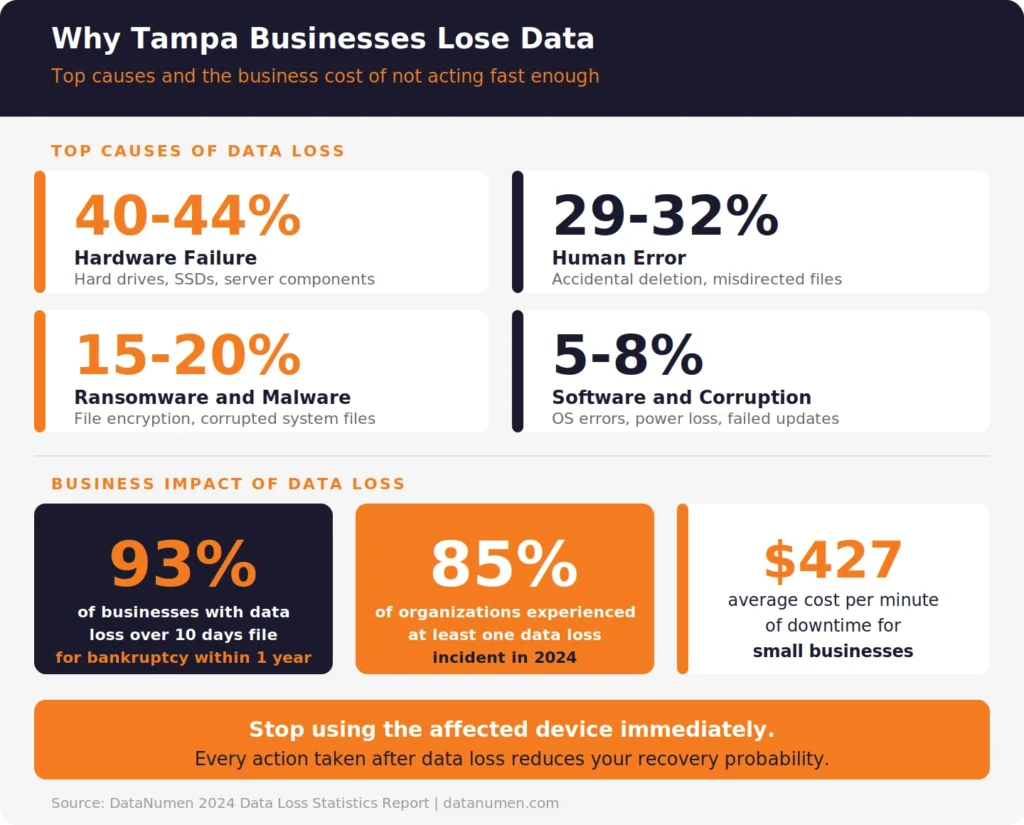
According to the DataNumen 2024 Data Loss Statistics Report, 93% of businesses that experience prolonged data loss lasting more than 10 days file for bankruptcy within a year. For Tampa businesses, that statistic reframes the question entirely. This is not about recovering files. It is about recovering your business.
The same report found that hardware failure accounts for 40 to 44% of all data loss incidents, making hard drive failure and SSD failure the most common triggers businesses face. The second leading cause is human error at 29 to 32%. Both are recoverable with the right provider and the right process.
What Response Time Should You Actually Expect?
For a true emergency, the best data recovery service providers in Tampa should offer same-day or next-business-day diagnostic assessment. Remote data recovery for logical failures can often begin within a few hours. Physical drive recovery requiring clean-room handling takes longer by nature, typically 3 to 7 business days depending on the severity of damage.
The red flag is a provider who cannot give you a timeline at all. Legitimate recovery specialists give you a recovery timeline estimate and a no-data-no-fee commitment upfront.
The Most Common Data Loss Scenarios Tampa Small Businesses Face
Understanding what caused your data loss directly affects which recovery process applies. Not every provider handles every failure type equally well.
Hard Drive and SSD Failure
Hard drive failure is the most frequently cited cause of data loss across businesses of all sizes. Symptoms include clicking or grinding sounds, drives that are not recognized by the system, or files that become inaccessible. According to DataNumen’s research, hardware failure accounts for between 40 and 44% of all organizational data loss incidents.
SSD failure behaves differently. SSDs fail silently and suddenly. There are often no warning sounds, and the data can become completely inaccessible within a very short window. SSD data recovery requires specialized tools and processes that differ significantly from traditional hard drive recovery. Confirm any provider you consider has specific SSD recovery capability, not just general drive repair.
RAID Array Failures
RAID data recovery is technically complex. A RAID array distributes data across multiple drives to improve performance and redundancy, but a RAID failure often involves multiple simultaneous drive problems or a controller failure that makes the entire array unreadable. Rebuilding a RAID requires understanding the original RAID configuration and using forensic imaging to work from copies, never directly on the original drives.
Tampa businesses running servers with RAID storage, whether RAID 0, 1, 5, or 10 configurations, need a provider who handles RAID recovery specifically. A general IT repair shop is the wrong choice for RAID. The wrong approach destroys data permanently.
Accidental Deletion and File Corruption
Accidental deletion and corrupted files are logical failures rather than physical ones. These are often recoverable remotely, without the drive needing to leave your office, provided the drive has not been overwritten with new data after the deletion event.
The critical rule: stop using the affected drive immediately. Every file written to a drive after deletion reduces recovery success probability. The faster you contact a data recovery expert, the higher the chance of a full recovery.
Understanding how regular computer backup services work and why they matter is directly connected to this scenario. Businesses with tested backups recover in hours. Businesses without them are fully dependent on the recovery process.
Ransomware and Malware-Driven Data Loss
Ransomware encrypts your business files and demands payment to restore them. This is both a cybersecurity incident and a data recovery situation. The recovery approach depends on whether you have clean backups, whether the encryption can be reversed with published decryptors, and whether the attacker’s encryption was implemented correctly or contained errors that allow recovery without the key.
Data recovery providers handle the technical extraction and restoration. Cybersecurity specialists handle the investigation and containment. For Tampa businesses, you ideally need both. Reviewing what cybersecurity services for small businesses should include helps you understand where recovery ends and prevention begins.
What Should You Demand from Any Emergency Data Recovery Provider Before Agreeing to Work With Them?
Before handing your drive to any data recovery service provider in Tampa, get clear answers to these questions. Any hesitation or vague response is a signal to keep looking.
1. Do you offer a free or flat-fee diagnostic assessment? Legitimate providers diagnose the drive before quoting a recovery price. You should know what failed and roughly what can be recovered before agreeing to any charges. No-data-no-fee policies are standard among credible providers.
2. Do you work from forensic images, not original media? Professional data recovery always begins by creating a forensic image of the failing drive before any recovery attempt. Working directly on original damaged media risks permanent loss. If a provider skips this step, your data is at greater risk after they touch it than before.
3. What is your clean-room capability for physical drive failures? Hard drives are sealed precision devices. Any provider attempting to open a drive outside a certified clean-room environment introduces dust particles that destroy the read heads and platters. Physical recovery requires ISO Class 5 or better clean-room conditions. Ask directly.
4. Can you handle RAID recovery and what RAID configurations have you worked with? RAID recovery is a specialization. Ask which RAID levels they have recovered from, and ask for a general description of their process. A provider who cannot explain RAID imaging and configuration reconstruction clearly has not done it at scale.
5. What is your data security and confidentiality protocol? Your business files contain customer data, financial records, and proprietary information. Ask how data is stored during the recovery process, who has access, and how drives are returned or wiped after work is complete. This matters for compliance in regulated industries.
6. What is the realistic timeline for my specific failure type? Logical failures are often resolved in 24 to 72 hours. Physical failures typically take 3 to 7 business days. RAID recovery varies by array size and damage complexity. Any provider who cannot give you a range for your specific situation is guessing.
See Backup and Recovery Plans for Tampa Businesses
How to Choose Between Remote and On-Site Data Recovery in Tampa
The right recovery method depends on what failed and how.
| Failure Type | Recovery Method | Typical Timeline |
|---|---|---|
| Accidental deletion (no overwrite) | Remote logical recovery | Hours to 1 business day |
| Corrupted OS or file system | Remote or on-site logical | 1 to 2 business days |
| Failed SSD (logical failure) | Remote tool-based recovery | 1 to 3 business days |
| Clicking or unrecognized hard drive | Physical, clean-room required | 3 to 7 business days |
| RAID array failure | Physical and logical, on-site or lab | 5 to 10 business days |
| Ransomware encryption | Logical with backup restoration | Hours to days (if backup exists) |
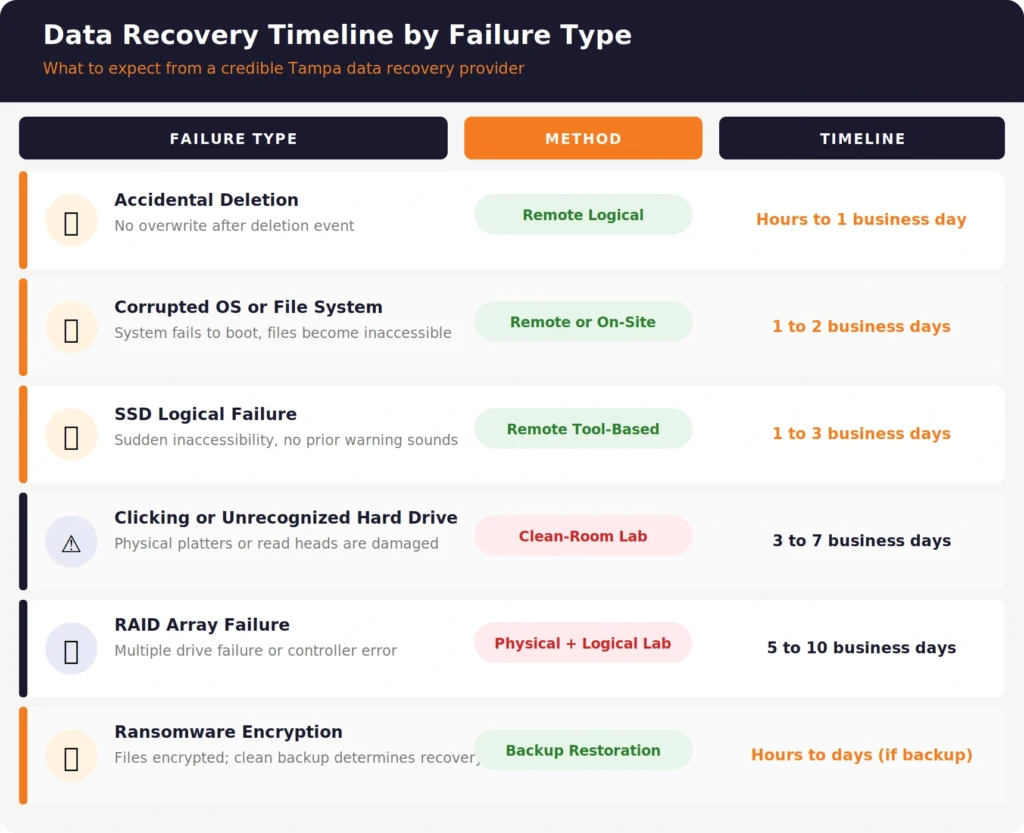
Remote recovery is faster, more affordable, and does not require you to ship or transport a potentially fragile failing drive. For logical failures across the Tampa Bay area, remote recovery is often the best first step. Services like remote IT support for small businesses cover exactly this scenario: a specialist connects to your system securely and begins work without any physical delay.
Physical failures require hands-on lab work. For these cases, choosing a local Tampa data recovery lab reduces transit risk compared to shipping a damaged drive across the country.
What Does the Recovery Process Actually Look Like Step by Step?
Understanding the data recovery process helps you evaluate emergency data recovery service providers in Tampa more accurately and set realistic expectations for your team.
- Initial contact and symptom assessment. You describe the failure symptoms and the provider determines whether the failure is likely physical or logical. This takes minutes.
- Drive intake or remote connection. For physical failures, you bring or ship the drive. For logical failures, the technician connects remotely or picks up on-site.
- Forensic imaging. The provider creates a bit-for-bit copy of the drive before any recovery work begins. This protects the original evidence and gives the technician a safe working copy.
- Diagnostic analysis. The technician analyzes the image to determine what data exists, what is intact, what is corrupted, and what the recovery probability looks like for specific file types.
- Recovery attempt and file verification. Recovery tools or manual reconstruction techniques are applied to extract files. Results are verified for integrity before being returned to you.
- Secure delivery and drive disposition. Recovered files are delivered via encrypted transfer or secure physical media. The original drive and forensic image are handled according to your data security requirements.
For businesses that have never experienced a major data loss event, the process feels daunting. A good way to prepare is understanding how a professional computer diagnostic and repair service approaches device assessment, since the same disciplined evaluation process applies to data recovery.
Does Your Industry Affect What Kind of Data Recovery You Need?
Yes. Tampa businesses in regulated industries face additional requirements that a general data recovery provider may not be equipped to meet.
Healthcare businesses under HIPAA need a Business Associate Agreement (BAA) signed before any provider handles patient data. Finance and legal businesses need documentation that recovered data was handled under chain-of-custody controls. Any business holding customer personal data needs assurance that recovery does not introduce a secondary data exposure event.
For Tampa businesses dealing with incidents that may also involve identity exposure, reviewing what identity theft protection services cover helps clarify where data recovery ends and personal data remediation begins.
What Should You Do Right Now If You Are Facing a Data Loss Emergency?
If you are reading this during an active data loss situation, these are the immediate steps that protect your recovery options.
- Stop using the affected device immediately. Every write operation after data loss reduces recovery probability. Shut the system down if possible.
- Do not run consumer data recovery software on a failing drive. DIY tools can overwrite the data you are trying to recover. They are appropriate for minor logical errors on healthy drives, not for failed or clicking hardware.
- Do not try to open a hard drive. This destroys the drive permanently outside of a clean-room environment.
- Contact a professional immediately. The faster you get a qualified technician on the problem, the higher the recovery success rate.
- Document what happened. Note when the failure started, any error messages, any sounds the drive made, and what was last accessed. This context speeds up the diagnostic process.
If you are not in an active emergency right now, the most valuable thing you can do is build a backup and disaster recovery plan before you need it. The Florida IT services page outlines how local businesses can structure ongoing IT support to reduce their exposure to exactly these situations.
When Data Loss Happens, Who You Call First Matters Most
The difference between recovering your data and losing it permanently often comes down to the first 30 minutes after a failure. Who you contact, what actions you take, and whether you trust a qualified specialist or a generalist who “thinks they can fix it” determines the outcome.
OneClick Technologies LLC supports small and mid-size businesses with expert IT services including data recovery support, remote diagnostics, computer repair, and backup planning. When Tampa businesses face a data loss emergency or want to build the kind of IT infrastructure that prevents one, the team at OneClick Technologies LLC brings the technical depth and response focus the situation demands.
Explore support and service options or connect directly to get fast, professional guidance on your specific data recovery situation.
Start Your Data Recovery Assessment Today
Frequently Asked Questions
What is emergency data recovery and when do you need it?
Emergency data recovery is the immediate professional retrieval of business-critical data from failed, corrupted, deleted, or compromised storage media. You need it when normal operations cannot continue due to data loss, when a drive is making unusual sounds, when files are encrypted by ransomware, or when a RAID array has failed. Fast data recovery service in Tampa begins with a same-day assessment in most critical failure scenarios.
Can you recover data from a physically damaged hard drive?
Yes, in most cases. Hard drive data recovery from physical damage requires a clean-room environment, forensic imaging, and in some cases replacement of failed internal components. Recovery success rates depend on the type of physical damage, how quickly the drive was powered down after failure, and whether any prior recovery attempts were made on the original media. Do not power a clicking drive back on repeatedly. Each restart attempt increases the chance of permanent damage.
How long does emergency data recovery take in Tampa FL?
Timeline depends on the failure type. Logical failures such as accidental deletion or file corruption are often resolved remotely within 24 to 72 hours. Physical drive failures typically take 3 to 7 business days in a recovery lab. RAID data recovery varies from 5 to 10 business days depending on array complexity and damage level. A reputable provider gives you a specific timeline estimate after the initial diagnostic, not before.
Is remote data recovery safe for business files?
Remote data recovery uses encrypted connections and operates on your system directly. For logical failures, it is both safe and faster than physical transport. Your files never leave your network location unless you choose to have them delivered via encrypted transfer. For physical failures, remote recovery is not an option since the damaged hardware needs hands-on lab work.
What is the difference between data recovery and data backup?
Data backup is proactive: copies of your files are stored in a secondary location before any failure occurs. Data recovery is reactive: a specialist attempts to retrieve files after a failure has already happened. Backup is reliable and fast. Recovery is uncertain and slow by comparison. The existence of tested backups makes even major failures manageable within hours. Without backup, the same event can take days to weeks to resolve, with no guarantee of full recovery. Building proper computer backup routines is the most effective way to reduce dependence on emergency recovery services entirely.
How do I know if data recovery is even possible for my situation?
The honest answer is that a proper diagnostic assessment is the only way to know. Recovery success varies by failure type, drive age, how the drive was handled after failure, and whether any prior recovery attempts were made. A reputable provider offers a diagnostic before any commitment to charges. Be cautious of any provider who quotes a guaranteed full recovery before seeing the drive.