Table of Contents
Key Takeaways
- Online virus removal in Miami typically costs between $99 and $150 along with malware removal, versus $200 to $300 or more at local computer repair shops, and completes in hours rather than days.
- AV-TEST registers over 450,000 new malware samples every day, making threat volume a serious and growing concern for Miami home users.
- Consumer devices had a 3.07% malware infection rate in 2024, up more than 28% year over year, meaning the average home PC is at greater risk than most users realise.
- Remote virus removal is appropriate for the vast majority of infections. Physical damage, a PC that cannot boot, or no internet connectivity are the situations where a local shop is the correct choice.
- A complete removal session includes post-removal verification, not just running a scan and calling it done.
- If an infostealer or trojan is found, password changes and account monitoring are required steps beyond the technical cleanup.
- Recurring infections are a sign of a deeper security gap, not bad luck.
For Miami home users searching for a reliable online virus removal service for PC in Miami, remote support through OneClick Technologies LLC is typically faster, more affordable, and more convenient than driving your laptop to a local shop and waiting days for it back.
But the right choice depends on what is actually wrong with your computer and what you are paying for. This guide breaks down the real cost difference, what each service includes, and the situations where one option clearly wins over the other.
What Is the Actual Cost Difference Between Online and Local Virus Removal in Miami?
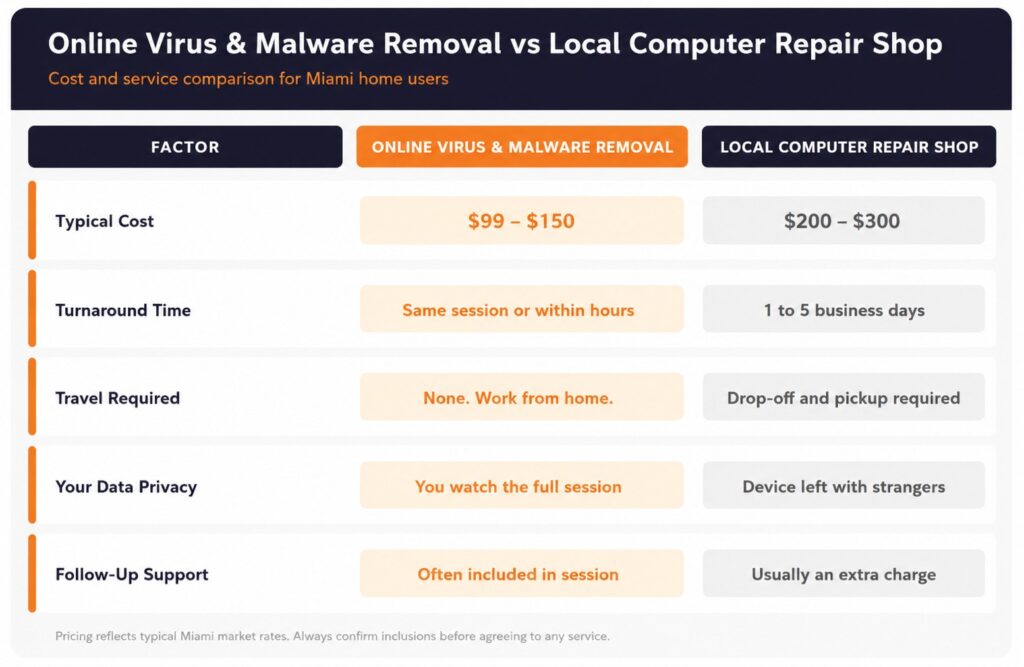
Online virus removal in Miami typically costs between $99 and $150 along with malware removal for a standard infection, while local computer repair shops in the Miami area generally charge between $200 and $300 for the same job, plus the time it takes to transport your device and wait for it to be returned.
The cost gap comes from overhead. A local shop pays rent, utilities, and in-person staffing. An online service connects directly to your PC, runs the removal process remotely, and passes those savings on. You pay for the technician’s time and expertise, not their storefront.
Here is a side-by-side comparison of what each option typically involves:
| Factor | Online Virus & Malware Removal | Local Computer Repair Shop |
|---|---|---|
| Typical cost range | $99 – $150 | $200 – $300 |
| Turnaround time | Same session or within hours | 1 to 5 business days |
| Travel required | None | Drop-off and pickup |
| Works on laptops and desktops | Yes | Yes |
| Works on Windows and macOS | Yes | Yes |
| Technician sees your screen | Yes (with permission) | Yes (in person) |
| Risk of physical damage during transport | None | Present |
| Follow-up support included | Often included | Usually extra charge |
The pricing above reflects what Miami-area users typically encounter. Always confirm what is included before agreeing to any service.
Why Are Miami Home Users Facing More Virus and Malware Threats Than Ever?
The threat volume is not slowing down. According to AV-TEST, the global malware institute, over 450,000 new malicious programs are detected every single day. That figure has grown consistently year over year, meaning the average PC user in Miami faces a threat environment that is measurably more hostile than it was even two years ago.
Research via pctechkits found that consumer devices had a 3.07% malware infection rate in 2024, up more than 28% year over year. That rate applies directly to home users with everyday Windows laptops and desktops across Miami, Miami Beach, and Miami Gardens.
The infections themselves have also changed. A slow computer used to mean a basic virus. Now the same symptom can mean spyware quietly logging keystrokes, adware injecting pop-up ads, a trojan giving someone remote access to your files, or ransomware preparing to lock your entire drive. Knowing which type of infection you have changes how it gets removed, and how urgently you need professional help.
Common infection symptoms Miami home users report:
- PC running significantly slower than normal without explanation
- Unexpected pop-up ads appearing on the desktop or inside browsers
- Browser homepage or search engine changed without permission
- Antivirus software disabled or unable to update
- Programs opening or closing on their own
- Unknown charges appearing in bank or PayPal accounts after using the PC
If your computer is showing two or more of these signs simultaneously, a professional virus and malware removal service is the correct next step rather than running a free scanner and hoping for the best.
What Does an Online Virus Removal Service for PC in Miami Actually Include?
An online virus removal service for PC in Miami connects a trained technician to your computer using a secure remote access tool, with your permission, to identify and eliminate malware, spyware, ransomware, trojans, adware, and other malicious software without you needing to leave your home.
A complete remote virus removal session should cover:
- Full virus scan across all drives, partitions, and startup entries
- Manual review of running processes, scheduled tasks, and browser extensions
- Removal of identified malware, spyware, and adware
- Reset of browser settings hijacked by malicious software
- Check and repair of system files damaged by the infection
- Review of antivirus status and basic hardening recommendations
- Confirmation that the system is clean before the session ends
What separates a thorough remote session from a rushed one is that final step. Any technician who ends the call before verifying the system is clean has not finished the job. Ask specifically whether the session includes post-removal system verification.
For users who want to understand more about what happens during a typical remote computer repair session, the guide on remote PC repair, virus removal, and tech support walks through the process in full detail.
When Does a Local Computer Repair Shop Make More Sense Than Online Removal?
Remote virus removal handles the vast majority of malware infections. But there are specific situations where a local shop is the correct choice.
Physical hardware damage. If your laptop has a cracked screen, damaged keyboard, or a failing hard drive alongside the virus infection, remote support handles the software but cannot fix the hardware. A local repair technician needs hands-on access for that work.
The PC won’t turn on or connect to the internet. Remote removal requires the PC to be operational and connected. If malware has corrupted the operating system to the point where the computer cannot boot or reach the internet, a technician needs physical access to boot from an external drive and run recovery tools.
No access to the computer at all. Elderly users or those unfamiliar with allowing remote access may find it easier to hand the device to a local technician directly. That is a completely valid preference.
For everything else, including spyware removal, browser hijacks, ransomware in its early stages, slow performance caused by malicious software, and computer virus removal without hardware involvement, remote service is faster, equally effective, and significantly cheaper.
What Are the Hidden Costs of Choosing a Local Repair Shop?
The quoted price is rarely the final price at many local computer repair shops. Miami home users frequently report additional charges that were not mentioned at drop-off.
Common add-ons to watch for:
- Diagnostic fee charged separately from the actual repair cost
- “Deep clean” or “optimization” upsells added without clear explanation
- Antivirus software pushed as a required purchase to complete the job
- Data backup charge before any work begins
- Expedite fee if you need the PC back sooner than their standard queue
Beyond the financial side, there is a privacy consideration. When you hand your laptop to a local shop, an unknown technician has full physical access to all your personal files, saved passwords, photos, and financial documents for however long the repair takes. That risk is real, and it is one that remote service eliminates. A remote session happens while you watch, and ends when you choose.
If you are a home user dealing with recurring infections, understanding how proper computer backup services protect your data before a virus removal session is an important step that most shops will not walk you through unless you ask.
How to Choose the Right Online Virus Removal Service in Miami
Not every remote computer repair service delivers the same result. Here is what separates a qualified online virus removal service for PC in Miami from one that runs a quick scan, calls it done, and charges you anyway.
1. They confirm what was found before starting removal. A technician who begins deletion without explaining what they found is not being transparent. You should know whether you have a basic adware infection or something more serious like a trojan or ransomware before any action is taken.
2. They use your permission for every remote access session. You initiate the connection. You can end it at any time. Any service that asks you to install software that “stays on your computer” after the session is not standard practice.
3. They verify the system is clean before ending the session. Post-removal verification means running a second scan, confirming no malicious processes remain active, and checking that browser settings are restored. This step is what makes the difference between a PC that stays clean and one that re-infects within days.
4. They provide basic prevention advice before closing. A good technician mentions how the infection likely got in: a suspicious email attachment, a fake software update, a compromised website. That context helps you avoid the same mistake again. Reviewing the signs of an infected PC and how virus removal works helps you recognise warning signs earlier next time.
5. They do not push unnecessary products. You do not need to purchase a new antivirus subscription to complete a virus removal session. Windows Defender, kept updated, provides solid baseline protection for most home users. A technician recommending paid antivirus software during a removal job should explain clearly why your existing setup is insufficient, not just add it to the bill.
Does Virus Removal Also Fix Slow Performance?
Yes, in most cases. Slow performance is one of the most common symptoms of a malware infection, and removing the malicious software responsible typically restores significant speed. Spyware and adware in particular run continuously in the background, consuming CPU and memory resources even when you are not actively using the infected application.
That said, not every slow PC is infected. Age of hardware, a full hard drive, too many startup programs, or an outdated operating system can all cause the same symptom. A qualified technician distinguishes between a malware-related slowdown and a hardware limitation, so you are not paying for virus removal when the actual problem is something else entirely.
For laptops and desktops that are slow but do not appear infected, the computer diagnostic and repair service approach applies: diagnose first, then repair what is actually wrong.
What Happens If Malware Has Stolen Your Personal Data?
This is the scenario most home users do not prepare for. Some infections, particularly infostealers and banking trojans, are designed not to disrupt your computer but to collect data silently. By the time you notice something is wrong, the infection may have been active for days or weeks.
If a technician identifies an infostealer or a trojan during a removal session, the immediate technical cleanup is only the first step. You should also:
- Change passwords for all accounts you accessed on the infected PC, starting with banking and email.
- Check your bank and credit card statements for any unrecognised transactions.
- Enable two-factor authentication on all major accounts immediately.
- Review whether any saved passwords in your browser were exposed.
- Monitor your credit report for signs of identity misuse in the weeks following the incident.
Understanding how identity theft protection services work is directly relevant here. The virus removal cleans the machine. Identity protection addresses what may have happened while the infection was active.
When Your PC Has a Virus, Speed Is the Deciding Factor
Every hour a virus runs on your computer, it is either collecting data, spreading to other files, or degrading your system further. Waiting for a local shop’s queue when remote help is available within the hour is a tradeoff most home users do not need to make.
OneClick Technologies LLC provides professional remote virus removal and computer repair support for home users across Miami and the rest of Florida. Whether your PC is crawling with adware, your browser has been hijacked, or you have spotted something unfamiliar running in the background, the expert team at OneClick Technologies LLC diagnoses the issue, removes it completely, and confirms your system is clean before ending the session.
Explore computer repair service options or see how remote tech support drives real results for users who have made the switch from local shops to remote-first support.
Start Your Virus Removal Session With OneClick
Frequently Asked Questions
1) How much does online virus & malware removal cost in Miami compared to a local shop?
Online virus & malware removal in Miami typically costs +$99.00 for a standard infection. Local computer repair shops in Miami generally charge between $200 and $300 for the same job, not including diagnostic fees, transport time, or any additional services added during the repair. Remote service is usually faster and less expensive for infections that do not involve hardware damage.
2) Can a technician remove a virus from my PC without me bringing it in?
Yes. A remote virus removal service connects to your computer securely over the internet, with your permission, and runs the full removal process while you watch. The technician sees exactly what you see on your screen and works through the infection in real time. This covers the large majority of malware types including spyware, adware, browser hijacks, and trojans. Physical hardware problems are the exception where in-person service is required.
3) How long does an online virus removal session take?
Most standard virus removal sessions take between 45 minutes and 2 hours depending on infection severity and system speed. Complex infections involving multiple malware types, rootkits, or significant system file damage may take longer. Remote service is typically completed the same day, while local shop turnaround in Miami often runs one to five business days.
4) Is it safe to let someone access my PC remotely?
Yes, when using a reputable service with standard remote access tools. You initiate the connection yourself using a session code, the technician can only see and control what you authorise, and you can end the session at any point by closing the application. The session does not leave permanent access on your computer. Avoid any service that asks you to install persistent remote software without a clear explanation of why it is needed.
5) What types of malware can be removed remotely?
Remote virus removal handles: computer viruses, spyware, adware, browser hijackers, trojans, ransomware in early stages before full encryption, rootkits in most cases, and potentially unwanted programs including toolbars and fake antivirus software. Infections that have corrupted the operating system to the point where the PC cannot boot or connect to the internet require physical intervention.
6) Should I run a free antivirus scan myself before calling a professional?
Running a free scan is reasonable as a first diagnostic step, but it is not a substitute for professional removal. Free scanner results often show what is present without fully removing it, particularly for spyware and rootkits that embed themselves deeply into the system. If a scan finds something but cannot remove it, or if your PC is still running slowly after the scan reports clean, a professional removal session is the correct next step. More context on how to handle a virus-related slowdown explains when DIY tools reach their limits.
7) Will virus removal fix my browser being hijacked?
Yes. Browser hijacking, where your homepage, default search engine, or new tab page has been changed without your permission, is typically caused by adware or a browser extension installed by malicious software. A complete virus removal session includes resetting all affected browser settings, removing the rogue extensions, and verifying that the changes hold after the session ends. Reviewing how online computer repair works for Windows and Mac gives useful context on what is covered in a remote repair session.