
Table of Contents
Key Takeaways
- Hardware malfunctions account for 44% of business data loss incidents, with human error responsible for another 32%, making these the two scenarios startups should prepare for most.
- 93% of organizations experiencing prolonged data loss lasting 10 days or more go bankrupt within a year, a statistic that hits startups with thin financial cushions especially hard.
- Reliable providers combine fast diagnostic response, no-data-no-fee pricing, and forensic-grade processes that protect your data rather than risk it further.
- RAID recovery and SSD recovery each require specific technical expertise. Confirm a provider’s specific experience rather than assuming general data recovery skill covers every scenario.
- Affordable does not mean cheap. Transparent flat-rate pricing with a real diagnostic step is the mark of a provider worth trusting with startup-critical data.
- Prevention after a recovery event, through automated backups and basic ongoing IT support, is the most cost-effective step a startup can take to avoid repeating this emergency.
OneClick Technologies LLC offers emergency data recovery services for startups the moment a failed drive or corrupted RAID array threatens your business. Every hour spent deciding who to trust is an hour where recoverable data can quietly become unrecoverable data. This guide is built for founders who need to make a fast, informed decision right now, not a slow education on what data recovery is.
You already know your business runs on data: customer records, financial files, product code, investor documents. What you need right now is a clear framework for choosing a provider who can actually get it back, and knowing which mistakes turn a recoverable situation into a permanent loss.
Why Startups Face Higher Stakes With Data Loss Than Established Businesses
A startup rarely has the financial cushion, backup redundancy, or IT staffing that larger companies build over years. When data loss hits a five-person startup, there is often no dedicated IT department to fall back on and no six-month runway to absorb the disruption while systems get rebuilt.
The numbers make the stakes clear. Research compiled by Business Dasher found that hardware malfunctions account for 44% of all data loss incidents, with human error responsible for another 32%. Together, those two causes explain the majority of data loss events startups actually face: a laptop drive failing mid-development sprint, or a founder accidentally deleting a shared drive folder days before a critical launch.
Invenio IT’s data loss report found that hard drive annualized failure rates rose to 1.42% in early 2025, with some hardware models failing at rates as high as 9.47%. For a startup running lean on a handful of laptops and one shared server, that is not an abstract statistic. It is a real probability that touches your business directly.
The same report cites a widely referenced industry figure: 93% of organizations that experience prolonged data loss lasting 10 days or more go bankrupt within the following year. Startups, operating with thinner margins and less institutional resilience than mature companies, are exactly the businesses this statistic describes.
What Should You Look for in Data Recovery Services for Startups?
The best providers combine fast turnaround, transparent no-data-no-fee pricing, forensic-grade recovery processes, and clear communication about what can realistically be recovered before any work begins. Speed matters, but not at the expense of technical discipline that protects your data rather than risking further damage.
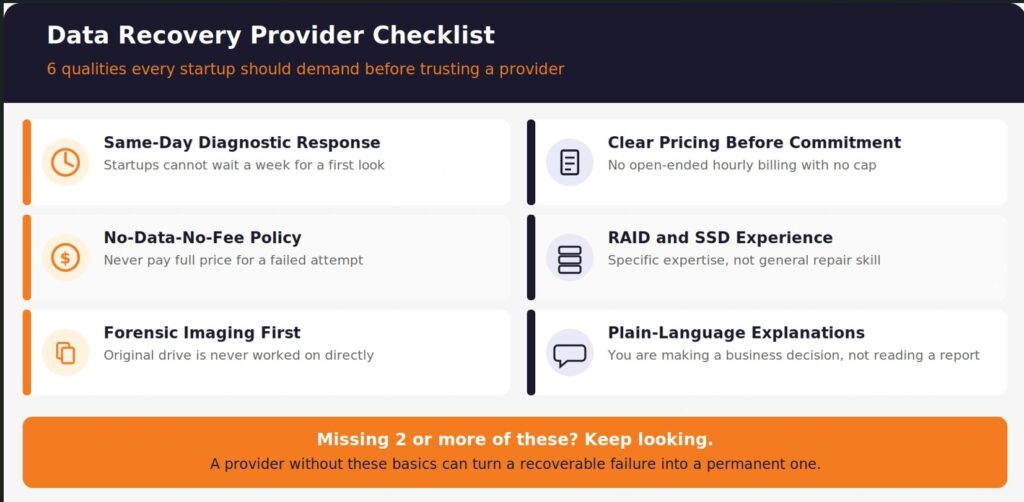
Here is what separates a provider built for startup urgency from one that will slow you down or make things worse:
- Same-day or next-business-day diagnostic response. A startup cannot wait a week for someone to even look at the failed drive.
- No-data-no-fee policy. You should never pay full price for a recovery attempt that fails.
- Forensic imaging before any recovery work. The original failing drive should never be worked on directly.
- Clear pricing before commitment. No open-ended hourly billing with no cap in sight.
- Experience across RAID, SSD, and traditional hard drive failures. Startups run varied infrastructure, often improvised under budget constraints.
- Plain-language explanations of what was found and what can be recovered. You are making a business decision, not evaluating a technical report you cannot parse.
What Types of Data Loss Do Startups Most Commonly Face?
Understanding what actually failed changes which recovery process applies and how urgently you need to act. Not every data loss scenario is treated the same way by a competent recovery provider.
Hard Drive Failure
Hard drive failure remains the most common cause of business data loss. Warning signs include clicking or grinding sounds, a drive the system no longer recognizes, or files that suddenly become inaccessible. If you hear unusual sounds from a laptop or desktop, power it down immediately. Continuing to use a failing drive increases the risk that recovery becomes impossible.
RAID Array Failures
RAID recovery is one of the more technically demanding recovery scenarios startups encounter, particularly for teams running a shared server or NAS device to store code repositories and shared files. A RAID failure often involves more than one drive failing simultaneously, or a controller error that makes the entire array unreadable. Attempting to rebuild a RAID array without the original configuration details, or working directly on the drives instead of a forensic image, is one of the fastest ways to turn a recoverable failure into permanent data loss.
Accidental Deletion
Accidental deletion is common in fast-moving startup environments where multiple people have edit access to shared drives and cloud storage. The good news: deleted files are frequently recoverable, especially if the affected drive stops being used immediately after the deletion is discovered. Every file written to that drive after deletion reduces the odds of a full recovery.
SSD Failures
Solid-state drives fail differently than traditional hard drives. There is often no warning sound, and data can become completely inaccessible within a very short window. SSD data recovery requires different tools and techniques than mechanical drive recovery. Confirm any provider you are evaluating has specific SSD recovery experience, not just general hard drive repair capability.
Ransomware and Malware
Ransomware attacks encrypt business files and demand payment for their release. This overlaps both cybersecurity and data recovery. Recovery depends on whether clean backups exist, whether the ransomware strain has a known decryption method, or whether the encryption implementation contains exploitable weaknesses. Reviewing what cybersecurity services a small business actually needs is directly relevant here, since prevention and recovery work best as a coordinated strategy rather than two separate problems.
How Fast Can a Trusted Recovery Provider Actually Deliver Results?
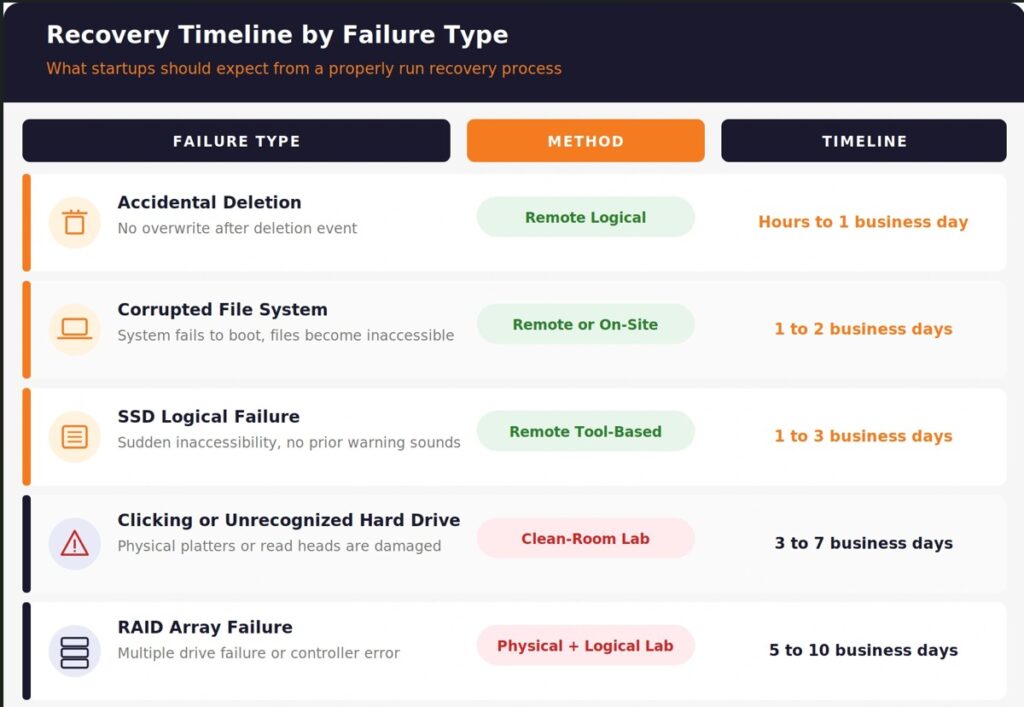
Recovery timelines depend on the type of failure, not the provider’s marketing promises. Logical failures such as accidental deletion are often resolved remotely within 24 to 72 hours. Physical failures requiring clean-room handling typically take 3 to 7 business days. RAID recovery timelines vary from 5 to 10 business days depending on array size and damage complexity.
| Failure Type | Recovery Method | Typical Timeline |
|---|---|---|
| Accidental deletion, no overwrite | Remote logical recovery | Hours to 1 business day |
| Corrupted file system | Remote or on-site | 1 to 2 business days |
| SSD logical failure | Remote tool-based recovery | 1 to 3 business days |
| Clicking or unrecognized hard drive | Physical, clean-room required | 3 to 7 business days |
| RAID array failure | Physical and logical, lab-based | 5 to 10 business days |
| Ransomware encryption | Backup restoration if available | Hours to days |
Any provider promising a guaranteed same-day full recovery for a physically damaged drive is either overpromising or skipping steps that protect your data. Be skeptical of timelines that sound too good given the failure type you are describing.
What Makes Data Recovery Services Affordable Without Cutting Corners?
Affordable data recovery services are priced transparently based on the actual complexity of the recovery, not padded with unnecessary fees or vague hourly billing with no ceiling. For a cash-conscious startup, cost matters, but the cheapest option is rarely the right one if it means working with a provider who lacks proper forensic processes.
What genuinely affordable looks like:
- A free or low-cost diagnostic assessment before you commit to the full recovery cost.
- A flat quote for the recovery, not an open-ended hourly rate that could balloon unpredictably.
- No charge if the recovery is unsuccessful. This is the industry standard among reputable providers, and any provider who charges full price regardless of outcome should raise questions.
- No upsells for services you do not need, like unnecessary data migration or unrelated hardware replacement bundled into the quote.
Cheap and affordable are not the same thing. Cheap often means corners cut on the forensic imaging step, or a provider without true clean-room capability attempting physical recovery in an unsuitable environment. Affordable means the price reflects real, properly executed work.
What Questions Should You Ask a Data Recovery Provider Before Committing?
Ask these questions directly. A provider confident in their process answers clearly and without hesitation.
1. Do you offer a free diagnostic before charging for recovery work? Legitimate providers assess the drive and tell you what is realistically recoverable before you commit to a price.
2. Do you work exclusively from a forensic image, not the original drive? This is non-negotiable. Working directly on damaged original media risks permanent, irreversible loss.
3. What clean-room capability do you have for physical drive failures? Opening a hard drive outside a certified clean-room environment introduces particles that destroy the platters and read heads.
4. Have you handled RAID recovery for the specific configuration we are running? RAID recovery expertise varies significantly between providers. Ask specifically, not generally.
5. What is your data confidentiality process during and after recovery? Startup data often includes investor documents, customer records, and proprietary code. Ask how the provider protects that data throughout the recovery process, and what happens to it afterward.
6. What is the realistic timeline for our specific type of failure? A provider who cannot give a specific range for your exact situation is guessing rather than diagnosing.
How Should Startups Prevent the Next Data Loss Event?
Recovery solves today’s emergency. Prevention determines whether you face this situation again. For a startup, the most cost-effective investment after a recovery event is closing the gap that caused it.
Steps worth prioritizing immediately after a recovery:
- Set up automated, tested backups rather than relying on manual saves or a single local drive. Reviewing how proper computer backup services work is the natural next step once your current emergency is resolved.
- Move critical shared files to cloud storage with version history, reducing the impact of both accidental deletion and hardware failure.
- Establish a basic IT support relationship rather than relying on ad hoc fixes each time something breaks. Startups that use ongoing remote IT support catch early warning signs, like a drive showing degraded health, before they become full failures.
- Document your infrastructure, including RAID configurations and drive models, so a future recovery provider has the context needed to work quickly.
- Review your team’s data handling practices to reduce accidental deletion risk, particularly around shared drives with broad edit access.
None of this requires enterprise-level budget. It requires treating data protection as an operational priority rather than an afterthought that only gets attention after something has already gone wrong.
Every Hour Matters When Your Startup’s Data Is at Risk
Data loss does not wait for a convenient time, and neither should your search for a trustworthy recovery provider. The decision you make in the next few hours can be the difference between a full recovery and a permanent setback your startup did not budget for.
OneClick Technologies LLC provides data recovery services for startups and small businesses who need fast, transparent, and technically sound recovery support when it matters most. From hard drive failures to RAID array complications, the expert team at OneClick Technologies LLC diagnoses your situation clearly and works to recover what matters before the window for recovery closes.
Review remote IT support options for growing teams or explore pricing built for startups and small businesses to understand what dependable recovery and ongoing protection actually look like.
Start Your Data Recovery Assessment Now
Frequently Asked Questions
1) What are data recovery services for startups?
They are professional recovery processes designed to retrieve business-critical data from failed, corrupted, or deleted storage media, delivered with the speed and cost sensitivity that early-stage companies need. This includes recovery from hard drives, SSDs, RAID arrays, and cloud-synced devices, typically through remote diagnostic access or physical lab work depending on the failure type.
2) How much do data recovery services typically cost for a startup?
Costs vary by failure type and complexity. Logical recoveries, such as accidental deletion, are generally less expensive than physical drive recovery or RAID reconstruction, which require clean-room handling and more technical labor. Reputable providers offer a diagnostic assessment before quoting a final price, and a no-data-no-fee policy ensures you are not charged full price for an unsuccessful attempt.
3) Can data recovery services recover data from a startup’s shared server or RAID array?
Yes, in most cases, provided the provider has specific RAID recovery experience. RAID failures are more complex than single-drive failures because they often involve multiple simultaneous issues or controller errors. A provider without dedicated RAID expertise risks making the failure worse rather than resolving it. Always confirm RAID-specific experience before entrusting a shared server recovery to any provider.
4) How quickly can a startup get data back after a failure?
Timeline depends entirely on the failure type. Logical failures like accidental deletion are often resolved remotely within 24 to 72 hours. Physical hard drive failures typically take 3 to 7 business days in a proper recovery lab. RAID array recovery generally takes 5 to 10 business days depending on array size and damage severity. A reputable provider gives you a specific range after diagnosing your exact situation, not a generic promise upfront.
5) What should a startup do immediately after discovering data loss?
Stop using the affected device or drive immediately. Do not attempt DIY recovery software on a physically failing drive, since this can overwrite recoverable data. Do not open a hard drive casing outside a clean-room environment. Contact a professional recovery provider as soon as possible, since recovery odds decrease the longer a failing drive continues to be used.
6) Is remote data recovery a real option for startups without in-house IT?
Yes, for logical failures such as accidental deletion, corrupted file systems, or certain SSD issues, remote recovery is both effective and significantly faster than shipping a drive to a physical lab. Remote recovery uses secure connections and does not require any hardware to leave your office. Physical failures involving clicking drives or damaged platters are the exception, requiring hands-on lab work in a clean-room environment.