
Key Takeaways
- Smartphone ownership among adults 50 and older rose from 55% in 2016 to 90% in 2025, with the average older adult now owning seven connected devices, meaning more moments where something breaks and fast help matters.
- 53% of seniors report feeling overwhelmed by new technology, which makes patient, same-day support far more valuable than a scheduled appointment days out.
- Real published pricing, such as OneClick Technologies LLC’s single incident support starting at $59.99, gives families a concrete benchmark instead of a vague quote.
- This kind of support should include same-day availability, plain-language explanations, transparent pricing, and welcome family involvement without hesitation.
- Most common senior tech problems, including frozen devices, scam pop-ups, account lockouts, and virus infections, are resolvable remotely the same day.
- Automatic backups and a standing provider relationship reduce how often emergency support is needed in the first place.
OneClick Technologies LLC offers on demand tech support for seniors the moment a frozen laptop, a locked phone, or a confusing pop-up brings the day to a halt. Whether you are the senior trying to figure out why your tablet will not connect to Wi-Fi, or an adult child fielding a worried phone call from a parent, what you need right now is a smart team that picks up, explains clearly, and actually fixes the problem the same day.
This guide covers what genuine same-day help for seniors looks like, what it actually costs, and exactly what to check before trusting anyone with a loved one’s device.
Do This First: A 3-Step Action Plan
If you are dealing with a tech problem right now, skip straight to this before reading further.
- Write down exactly what happened. The device, the error message or symptom, and when it started. This single step cuts diagnostic time dramatically once you reach a technician.
- Check published pricing before calling anyone. OneClick’s pricing lists real, itemized costs. Compare any quote you receive against these numbers.
- Contact a provider directly rather than clicking a pop-up or an unsolicited email. If the “help” found you first, it is very likely a scam. Real support starts when you reach out.
What is On Demand Tech Support for Seniors?
It is immediate, pay-as-you-go technical help for computers, phones, and tablets, available the same day a problem happens rather than requiring a scheduled appointment days out. It covers everything from a frozen screen to a scam pop-up to a smartphone that suddenly will not send texts, delivered with the one-on-one patience and plain-language explanation older adults specifically need to troubleshoot the issue without feeling rushed.
This matters more now than it used to. AARP’s research on technology trends among older adults found that smartphone ownership among adults 50 and older rose from 55% in 2016 to 90% in 2025, with the average older adult now owning seven separate technology devices, from tablets to smart TVs to video call setups like Zoom. More devices in daily use means more moments where something breaks and a senior needs help fast, not next week.
What Does This Kind of Support Actually Cost?
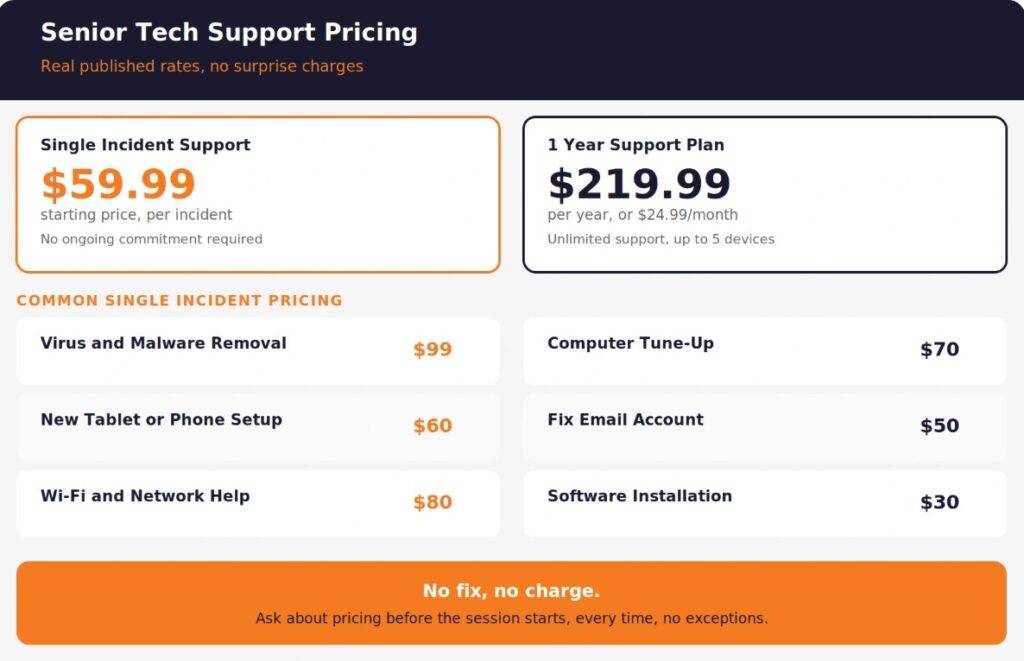
Real, published pricing gives families a concrete number to compare against instead of guessing what a fair rate looks like. Based on OneClick Technologies LLC’s pricing, here is what transparent on demand support looks like for seniors and their families:
| Support Type | Price | What It Covers |
|---|---|---|
| Single Incident Support | Starting from $59.99 per incident | One specific issue resolved, no ongoing commitment required |
| 1 Year Support Plan | $219.99 per year or $24.99 per month | Unlimited on-demand support, up to 5 connected devices |
| One-time setup fee | $24.99 | Initial account setup for the yearly plan |
The itemized single-incident pricing is worth knowing in advance. Virus and malware removal runs around $99, a computer tune-up is roughly $70, setting up new tablets and smartphones runs about $60, and simpler fixes like fixing an email account or installing software fall in the $30 to $50 range. Seeing real prices upfront, rather than a vague quote after the fact, is one of the clearest signs of a provider worth trusting with a senior’s device.
The detail that matters most in any pricing structure: a satisfaction guarantee where the family is not charged if the issue is not resolved. That policy says more about a provider’s confidence than any advertisement.
Why Do Seniors Specifically Need On Demand Support Rather Than Scheduled Appointments?
Waiting days for a scheduled tech appointment turns a small, manageable problem into a genuinely stressful situation for a senior who depends on that device daily. Standard technology support built for a general audience often assumes the caller already knows the vocabulary, moves through menus quickly, and does not need anything repeated. Senior tech support has to work differently. A locked phone means missed calls from family. A frozen computer might mean unpaid bills sit untouched. A scam pop-up left unresolved for a week is a week of anxiety about whether something serious happened.
Data compiled by World Metrics on elderly technology use found that 53% of adults 65 and older report feeling overwhelmed by new technology, with 31% specifically citing fear of making mistakes. That fear compounds when a device stops working and the senior does not know whether they caused it, whether it is serious, or whether they need to wait to find out. Immediate, calm, same-day help resolves both the technical problem and the anxiety around it.
On demand tech support removes the waiting. A senior calls, explains what happened in their own words, and a technician begins working the issue right away, whether that means a remote session or a phone-guided fix.
What Should You Expect From a Genuine On Demand Tech Support Service for Seniors?
A genuine on demand service for seniors provides patient, plain-language help available the same day, transparent pricing shown before any work begins, and technicians who explain what they are doing rather than working silently and handing back a fixed device with no context. This is what affordable tech support designed for older adults actually looks like in practice, not just in marketing copy.
What separates real on demand support built for seniors from generic tech help:
- Same-day availability, not a scheduled appointment days out for anything short of a true emergency.
- Multiple contact channels, including phone support for seniors less comfortable navigating a chat window or online form.
- Patient, plain-language explanations at every step, not rushed technical jargon.
- A named, consistent point of contact where possible. Familiarity reduces anxiety for repeat issues.
- Transparent, itemized pricing communicated before the session starts, never revealed only after the work is done.
- Family involvement welcomed, whether that means a family member joining a call or being kept informed afterward.
If a service you’re considering rushes past any of these points, especially transparent pricing or plain-language explanation, that is worth noticing before committing a parent’s device to their care.
What Kinds of Problems Does This Support Actually Solve?
Most day-to-day technology problems seniors encounter fall into a few recognisable categories, and on demand support is built to handle nearly all of them the same day, whether the goal is fixing a basic computer issue or helping a senior stay connected with family through video calls and messaging apps.
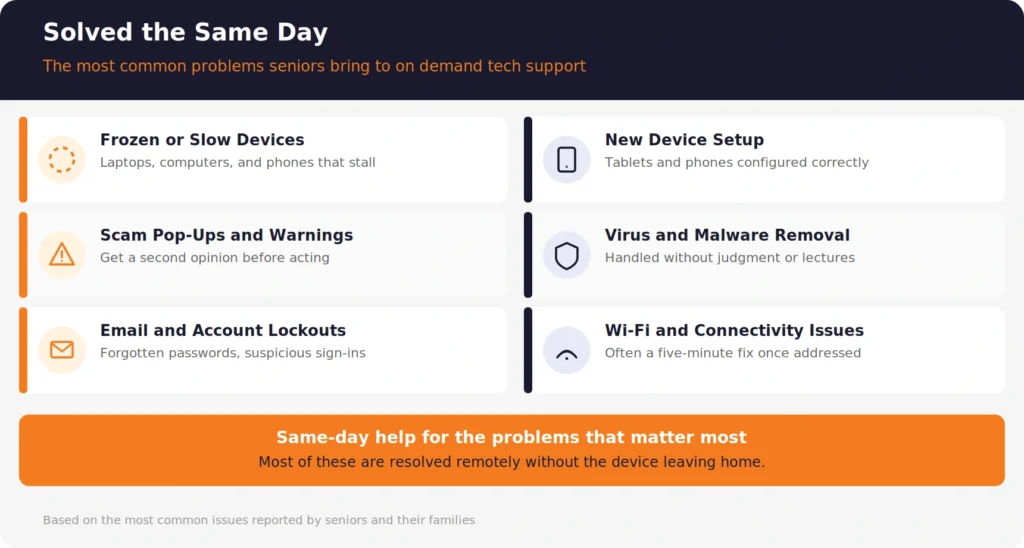
Frozen or slow devices:
A computer that has become sluggish over time, or a phone that suddenly freezes mid-use, is one of the most common reasons seniors reach out for help. Remote computer repair and virus removal resolve the majority of these issues without requiring the device to leave the home.
Scam pop-ups and suspicious warnings:
A pop-up claiming the device is infected, or an unexpected security alert, is frightening for anyone but especially unsettling for a senior unsure whether it is real. Getting a second opinion from a real technician before taking any action, including before calling any number shown in the alert, is the safest first step.
Email and account access problems:
A locked email account, a forgotten password, or a suspicious sign-in warning on a phone can feel urgent and confusing at the same time. On demand support walks through exactly what happened and whether the account was actually compromised.
New device setup:
A new tablet or smartphone from a family member is a common gift, and setting it up correctly the first time, with accounts, contacts, accessibility settings, and assistive technology features like larger text or voice control configured properly, prevents weeks of frustration afterward. Reviewing what home IT services are available gives a broader picture of what a single support relationship can cover beyond one-off fixes.
Virus and malware removal:
Thorough virus and malware removal handled without shaming the senior for whatever they clicked is a core part of genuine on-demand tech support, not an afterthought.
Wi-Fi and connectivity issues:
A router that needs resetting, or a phone that will not connect to home Wi-Fi, is often a five-minute fix once a technician is actually looking at it, rather than something a senior struggles with alone for hours.
On Demand Support vs Scheduled In-Home Visits: Which Fits Your Situation?
The right choice depends on the urgency of the problem and how comfortable the senior is with remote assistance.
| Factor | On Demand Remote Support | Scheduled In-Home Visit |
|---|---|---|
| Response time | Often same day | Days to a week, based on availability |
| Best for | Software issues, account problems, scam pop-ups, general troubleshooting | Physical hardware repair, complete comfort issues with any remote tool |
| Cost | Generally lower per incident | Generally higher due to travel time |
| Family can observe | Yes, if joining the call | Yes, if present during the visit |
| Comfort level required | Basic willingness to allow screen sharing with guidance | None required |
A practical approach many families use: try on-demand remote support first for anything software-related, and reserve in-home visits for hardware problems or for a senior who is simply more comfortable with a person physically present. Neither option is wrong. The right one depends on what actually broke and how the senior feels about it.
What Questions Should You Ask Before Choosing an On-Demand Tech Support Provider for a Senior?
Ask these questions directly. A provider confident in their service for seniors specifically answers all of them without hesitation.
1. How quickly can someone actually help today, not just acknowledge the request? On demand should mean a real same-day response, not just a ticket number.
2. Is pricing shown clearly before the work begins? Reference the published pricing directly during the call. A provider unwilling to quote a price upfront is a signal to keep looking.
3. Will a family member be able to join the session or get a summary afterward? Reluctance here is a red flag. Legitimate providers welcome family involvement.
4. How do you explain what you’re doing during the session? Plain language, not rushed jargon, is what separates support built for seniors from generic tech help applied to an older client.
5. What happens if the first attempt does not fully resolve the issue? A stated satisfaction policy, whether that is a refund or continued work at no extra cost, shows how the provider handles imperfect outcomes.
6. Do you offer both single-incident help and an ongoing plan? Flexibility matters. Some seniors need help once a year. Others benefit from unlimited access across the full year for a flat rate.
How Can Families Reduce the Need for Emergency Tech Support Between Visits?
On-demand support solves today’s problem. A few simple habits help seniors reduce how often that problem comes up in the first place.
- Set up automatic backups so a device failure never means losing photos or important documents. Understanding how backup services actually protect data is worth reviewing together with the senior so they understand what’s happening in the background.
- Write down account passwords somewhere secure and accessible, whether a physical notebook or a password manager set up during a support session, so future lockouts are quicker to resolve.
- Establish a standing relationship with one provider rather than searching for help fresh every time something breaks. Familiarity speeds up every future call.
- Review new pop-ups or warnings together rather than acting on them alone, at least until pattern recognition builds naturally over time.
- Keep a simple list of what devices exist and their basic details, so a technician can start working immediately instead of spending the first ten minutes gathering information the family already has.
None of this requires the senior to become technically confident on their own. It simply means fewer emergencies and faster resolutions when something does come up.
Help Should Never Feel Out of Reach When a Senior Needs It
A frozen laptop or a locked phone is stressful enough without also waiting days to get it fixed. The right on demand tech support turns a stressful moment into a same-day resolution, with pricing you already understand and a technician who explains every step along the way.
OneClick Technologies LLC provides on demand tech support for seniors with published, transparent pricing, a satisfaction guarantee, and technicians trained to explain things clearly rather than rush through a fix. Support is personalized and tailored to each senior’s comfort level, not a one-size-fits-all script, whether the person lives independently, with family, or in a senior living community. Whether the issue is a scam pop-up, a slow computer, a new phone that needs setup, or anything in between, the team is built around getting a senior’s device working again quickly and without confusion.
Review real client testimonials or explore the full pricing breakdown to see exactly what dependable, transparent support looks like before your family needs it.
Get Fast Help for a Senior’s Device Today
Frequently Asked Questions
What is on-demand tech support for seniors?
It is immediate, pay-as-you-go technical help for computers, phones, and tablets, available the same day a problem occurs rather than requiring a scheduled appointment. It is delivered by a support team trained specifically in senior tech support, with the patience, plain-language explanation, and willingness to include family members that older adults and senior citizens specifically benefit from, distinguishing it from generic tech support built for younger, more tech-comfortable users.
How much does on-demand tech support for seniors typically cost?
Pricing varies by issue and provider. Published rates from OneClick Technologies LLC show single-incident support starting from $59.99, with itemized pricing for specific issues like virus removal at approximately $99 or new device setup around $60. An annual plan covering unlimited on-demand support across up to 5 devices runs $219.99 per year, or $24.99 per month.
Can tech support really fix a senior’s problem the same day?
Yes, for the majority of common issues. Software problems, account lockouts, scam pop-ups, slow performance, and virus removal are typically resolvable the same day through remote support once a technician begins working the issue. Physical hardware repairs or complete comfort barriers with remote tools are the exceptions where an in-home visit or longer timeline may be needed.
Is remote tech support safe for a senior who is not comfortable with technology?
Yes, when the provider is legitimate and explains the process clearly before starting. Technical support delivered remotely means the senior initiates the connection, can see everything the technician does, and can end the session at any time. A family member joining the call is welcomed by any trustworthy provider. If a senior remains uncomfortable with the concept entirely, an in-home visit is a reasonable alternative.
What is the difference between on demand tech support and a scheduled in-home visit?
On demand support connects a senior with help the same day, usually remotely, for software and account issues. A scheduled in-home visit requires booking ahead and typically costs more due to travel time, but is necessary for physical hardware repairs or when a senior strongly prefers in-person help. Many families use on demand support for most issues and reserve in-home visits for the exceptions.
How do I know if a tech support offer for my parent is legitimate or a scam?
Legitimate providers never call unprompted claiming a device is already infected, and they always explain pricing before starting work. If a call or pop-up creates urgency and demands immediate payment through gift cards or wire transfer, it is very likely a scam, not real support. When in doubt, hang up or close the window, then reach out independently to a trusted, verified provider.