Table of Contents
Key Takeaways
- 78% of SMBs report that a single hour of downtime costs more than $10,000, making the case for on demand IT support far stronger than the modest per-incident cost most providers charge.
- Typical small businesses lose between $1,000 and $5,000 per hour during downtime once lost revenue, idle payroll, and recovery costs are combined.
- Real published pricing, like OneClick Technologies LLC’s single incident support starting at $59.99, gives you a concrete benchmark to compare against vague quotes from other providers.
- This model works best for occasional issues and businesses testing a provider relationship. Managed IT support fits businesses with consistent, recurring technology needs.
- A stated satisfaction guarantee, itemized pricing by issue type, and remote-first resolution are the clearest signs of a provider built for genuine responsiveness rather than marketing claims.
- Testing a provider with a single-incident purchase before committing to an ongoing plan is a low-risk way to evaluate real response time and communication quality.
OneClick Technologies LLC provides on demand IT support for small businesses, with real pricing published upfront instead of buried behind a sales call. When your point-of-sale system freezes an hour before close or your email account gets locked out mid-workday, you need someone who can start working the problem now, not a provider who wants to schedule a discovery call for next Tuesday.
This guide covers what on demand IT support actually costs, how it differs from a full managed IT contract, and the specific questions that separate a provider who shows up when it matters from one who leaves you waiting.
What Is On Demand IT Support for Small Business?
This kind of support is pay-as-you-go technical help available when a problem occurs, without requiring a long-term managed services contract. You pay for the specific issue resolved, whether that is a single incident or an ongoing subscription with unlimited access, rather than committing to a fixed monthly retainer regardless of how much support you actually use.
This model exists specifically for businesses that do not have consistent enough IT needs to justify full managed services, or who want the flexibility to test a provider before committing long-term. It fills the gap between doing nothing and signing a multi-year managed IT contract.
What Does This Type of Support Actually Cost?
Real pricing for on demand IT support varies by scope, but published rates give you a concrete benchmark to compare providers against, rather than guessing what a fair price looks like.
Based on OneClick Technologies LLC’s pricing, here is what transparent on demand support looks like in practice:
| Support Type | Price | What It Covers |
|---|---|---|
| Single Incident Support | Starting from $59.99 per incident | One specific technical issue, no long-term contract required |
| Business Support Plan | $49.99 per user, per month (3-user minimum, 1-year term) | Ongoing access to remote, chat, phone, and ticketing support |
| One-time setup fee | $49.99 | Covers initial account and system setup for business plans |
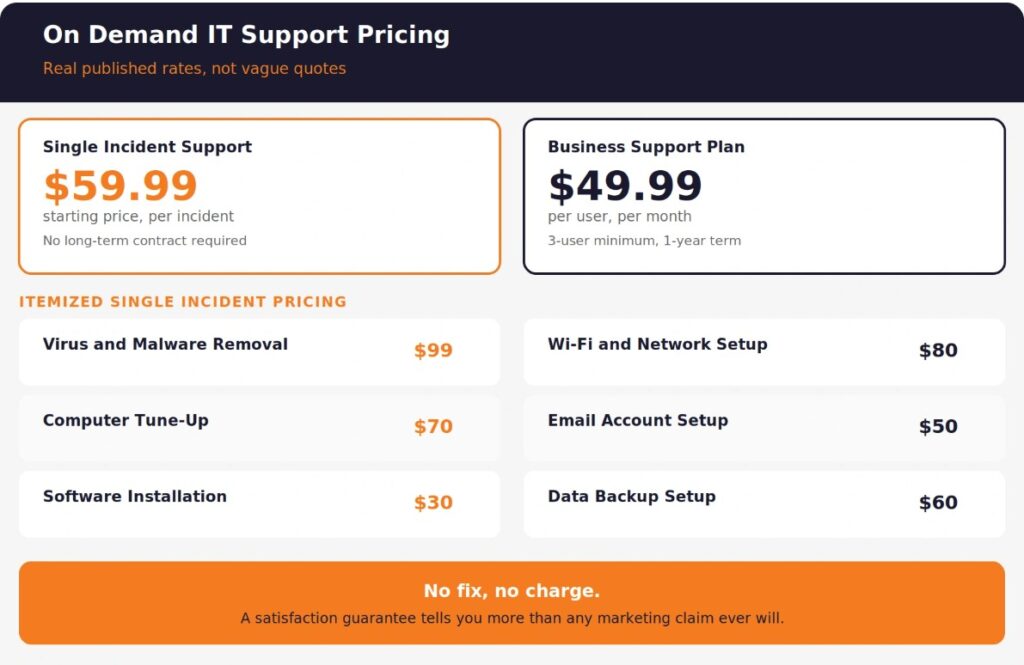
Single incident pricing on OneClick’s platform also breaks down by specific issue type, which is worth knowing before you call anyone. Virus and malware removal runs around $99, a computer tune-up is roughly $70, Wi-Fi and network troubleshooting is about $80, and simpler fixes like software installation or email account setup fall in the $30 to $50 range. Seeing itemized pricing before you commit is what separates a transparent provider from one that quotes vaguely and adjusts the number after the work is done.
The most important detail in the pricing structure itself: a satisfaction guarantee where you are not charged if the issue is not resolved. That single policy tells you more about a provider’s confidence in their own work than any marketing claim.
Why Do Small Businesses Need On Demand IT Support Instead of Waiting for a Full-Time Hire?
Hiring a full-time IT employee costs a small business significantly more than on demand or managed support, both in direct salary and in the coverage gaps that come from relying on a single person. The average annual cost of an in-house IT hire, once you factor in salary, benefits, and equipment, typically runs well into six figures for a qualified generalist, before accounting for the fact that one person cannot realistically cover every specialty from networking to cybersecurity to hardware repair.
This model solves the problem differently. You get access to a team with varied expertise, available exactly when you need them, without carrying the fixed cost of a full-time salary during the weeks nothing goes wrong.
The math becomes even clearer when you look at what unplanned downtime actually costs. Research cited by Network Installers found that 78% of SMBs report a single hour of downtime costs them more than $10,000, with the average small business experiencing roughly 14 hours of downtime annually. A separate analysis from CloudSecureTech found that typical small businesses lose somewhere between $1,000 and $5,000 per hour of downtime once lost revenue, idle payroll, and recovery costs are combined.
Against those numbers, a $59.99 single-incident fee or a $49.99 monthly per-user plan is not a large expense. It is a rounding error compared to what even one bad outage costs a business with no support relationship in place.
What Should You Expect From a Genuine On Demand IT Support Service?
A genuine on demand IT support service should give you clear response expectations, transparent per-incident or per-user pricing, multiple contact channels, and technicians who can resolve the majority of issues remotely without requiring you to wait for an on-site visit.
Here is what separates real on demand support from a service that only sounds responsive:
- Multiple contact channels. Live chat, phone, and a ticketing system, not just a single email address with no guaranteed response window.
- Remote-first resolution. Most software, network, and account issues do not require anyone to physically visit your office. Remote IT support for small businesses resolves the large majority of common problems without any travel delay.
- No long-term lock-in for single incidents. If you only need help with one specific problem, you should not be forced into a subscription to get it addressed.
- Transparent pricing shown before you commit. Itemized costs by issue type, not a vague “it depends” until after the work is finished.
- A stated satisfaction policy. Whether it is a refund, a no-fix-no-fee guarantee, or a documented escalation path, know what happens if the first attempt does not resolve the issue.
On Demand Support vs Managed IT Support: Which Does Your Small Business Actually Need?
The right choice depends on how frequently your business runs into IT problems and whether you need ongoing monitoring or just responsive help when something breaks.
| Factor | On Demand Support | Managed IT Support |
|---|---|---|
| Best for | Occasional issues, testing a provider, tight budgets | Businesses with regular, recurring IT needs |
| Pricing model | Per incident or flexible monthly plan | Fixed monthly retainer, often per device or user |
| Proactive monitoring | Typically not included | Included as a core feature |
| Commitment | Minimal to none for single incidents | Usually a 1-year minimum term |
| Cybersecurity coverage | Available as an add-on or separate service | Often bundled into the core plan |
| Ideal business size | Very small teams, seasonal businesses | Growing teams with consistent technology dependence |
Many small businesses actually use both models over time. A business might start with single-incident, on demand support while testing out a provider, then transition to a managed IT service for small businesses once their technology needs become consistent enough to justify proactive monitoring and ongoing coverage.
If your business is dealing with recurring cybersecurity concerns rather than isolated hardware issues, reviewing what cybersecurity services a small business actually needs is worth doing before choosing between the two models, since security coverage is rarely a good fit for pure pay-per-incident pricing.
What Questions Should You Ask an On Demand IT Support Provider Before You Need Them?
Ask these questions before an emergency hits, not during one. A confident provider answers all six clearly.
1. What is your typical response time for an urgent issue? On demand does not mean instant, but a provider should give you a specific expectation, not a vague “as soon as possible.”
2. Is pricing itemized by issue type, or is it a flat hourly rate with no ceiling? Itemized pricing protects you from surprise costs. Open-ended hourly billing without a cap is a common source of billing disputes.
3. What happens if the first attempt does not resolve the problem? A stated satisfaction policy, whether a refund or continued work at no extra charge, tells you how the provider handles imperfect outcomes.
4. Can most issues be resolved remotely, or does everything require an on-site visit? Remote-first support is almost always faster and more affordable for the majority of common problems.
5. Do you offer both single-incident and ongoing plans? Flexibility to start small and scale up as your needs grow is a sign of a provider built around your business, not just their own contract structure.
6. What is explicitly excluded from your on demand pricing? Data recovery, RAID issues, and certain hardware replacements often fall outside standard incident pricing. Know this before you are surprised by it.
How Fast Can On Demand IT Support Actually Resolve an Urgent Problem?
Resolution speed depends on the type of issue, but most common small business IT problems, such as email access issues, software errors, printer or network connectivity problems, and malware removal, are resolvable remotely within the same business day once a technician begins working the issue.
Physical hardware failures, complex network reconfigurations, or data recovery situations naturally take longer regardless of how “on demand” the provider markets itself. Any provider promising an unrealistic timeline for a complex hardware issue is setting expectations they cannot consistently meet.
For businesses that experience frequent hardware-related slowdowns rather than isolated incidents, a computer diagnostic and repair approach that identifies root causes prevents the same problem from generating repeat incident charges every few weeks.
How Do You Know If a Provider’s On Demand Support Is Actually Reliable?
Reliability shows up in specifics, not marketing language. Before committing, look for a documented track record and real client feedback rather than taking response time claims at face value.
Practical steps to verify reliability:
- Check independent reviews, not just testimonials curated on the provider’s own site. Reviewing real client feedback and testimonials gives you a more honest picture of typical response times and outcomes.
- Ask how the pricing page compares to what you’re actually quoted. If the number changes significantly once you’re on the phone, that is a red flag regardless of how professional the initial pitch sounded.
- Test with a smaller, single-incident purchase first before committing to a monthly plan. This lets you evaluate actual response time and communication quality with minimal financial commitment.
- Ask about backup and data protection practices, even for support-only relationships. If a technician is accessing your systems remotely, understanding how proper backup services protect your data matters even outside a full managed contract.
The Next Urgent IT Problem Will Not Wait for a Sales Call
Every small business eventually hits a moment where a system goes down, and the clock starts running on lost revenue, frustrated customers, or a missed deadline. Having a provider you trust, with pricing you already understand, means that moment becomes a quick fix instead of a scramble.
OneClick Technologies LLC provides on-demand IT support for small businesses with itemized pricing, a satisfaction guarantee, and technicians who resolve most issues remotely without unnecessary delay. Whether you need a single incident resolved today or you are evaluating a longer-term support relationship, the expert team at OneClick Technologies LLC is built around getting your business back to normal quickly.
Review real client testimonials and results or explore the full pricing breakdown to see exactly what dependable, transparent IT support looks like before you need it.
Get Help With Your IT Problem Today
Frequently Asked Questions
What is on demand IT support for small business?
It is technical help available when a problem occurs, billed per incident or through a flexible subscription, without requiring a long-term managed services contract. It is designed for businesses that need responsive help without committing to fixed monthly retainers for proactive monitoring they may not consistently use.
How much does on demand IT support typically cost?
Pricing varies by provider and issue type. Published rates from OneClick Technologies LLC show single-incident support starting from $59.99, with itemized costs by issue type ranging roughly from $30 for simple fixes like software installation up to around $99 for virus and malware removal. Business support plans with ongoing access typically run $49.99 per user per month with a multi-user minimum.
Is on demand IT support better than hiring a full-time IT employee for a small business?
For most small businesses with inconsistent or moderate IT needs, on demand support is more cost-effective than a full-time hire. A single IT employee costs significantly more annually once salary, benefits, and equipment are factored in, and one person cannot realistically cover every specialty a business might need. On demand support gives access to a broader range of expertise without the fixed overhead of a full-time salary.
Can on demand IT support handle urgent problems the same day?
Yes, for most common issues. Email access problems, software errors, network connectivity issues, and malware removal are typically resolvable remotely within the same business day once a technician begins working the issue. Physical hardware repairs, complex network reconfigurations, and data recovery situations generally take longer regardless of the support model.
What is the difference between on demand IT support and managed IT support for small business?
On demand support is pay-as-you-go, billed per incident or through a flexible plan, without proactive monitoring included by default. Managed IT support for small business is a fixed monthly retainer that typically includes continuous monitoring, patch management, and broader cybersecurity coverage as part of the core service. Businesses with occasional needs tend to prefer on demand support, while businesses with consistent, ongoing technology dependence benefit more from a full managed IT service.
Does on demand IT support include cybersecurity protection?
It depends on the provider and plan. Basic on demand support typically addresses individual technical issues as they arise rather than providing continuous threat monitoring. For businesses concerned about ongoing cybersecurity risk rather than isolated incidents, a dedicated cybersecurity service or managed IT plan with security coverage built in is usually a better structural fit than pay-per-incident pricing.