Table of Contents
Key Takeaways
- A vague SLA, not a lack of technical skill, is usually why the last managed IT service failed you.
- Small businesses represent 43 percent of all data breaches, so security ownership must be explicit in any contract.
- Ask all six vetting questions live, in a call, and write down the exact answers.
- Test a new managed IT provider with a single incident before committing to an annual plan.
- Compare any quote against OneClick’s published pricing so you know exactly what you are paying for.
OneClick Technologies LLC gets this question from business owners almost every week: a previous provider disappeared during an outage, billed for work never done, or left a network exposed until a breach forced the issue. If you are searching for a managed IT provider for small business again after being burned once, the fix is not luck. It is a short, specific vetting process you run before you sign anything.
Some owners call this shopping for a managed service provider, others say IT provider, help desk, or simply deciding to outsource for the first time. What matters is whether the service offerings on the table match your business needs, business goals, and the support services you were promised but never received.
Do This First: A 5-Question Vetting Call
Before you read another vendor’s marketing page, call three candidates and ask these five questions live. Write down the exact answers, not the vibe.
- What is your guaranteed first-response time in writing, not “usually” or “typically”?
- Can I see a redacted sample of a client’s monthly reporting?
- Who owns cybersecurity if something goes wrong: you or a third party you outsource to?
- What happens to my data and devices if I cancel with 30 days notice?
- Can you name two clients I can call directly, not just a testimonial page?
If a provider hesitates on any of these five, that is your answer before you spend another dollar.
Why Your Last Managed IT Service Probably Failed You
Most bad experiences with a managed IT service for small business trace back to three root causes: a vague service level agreement, a single technician handling too many clients, and no clear ownership of security. A CompTIA buying guide for managed services points out that the biggest gap between a good and bad managed services relationship is almost always contract clarity, not technical skill. Providers that sound confident on a sales call but write loose contracts are the ones that vanish when a server goes down at 4 PM on a Friday.
Small businesses are also a preferred target for attackers precisely because IT support is often thin. Verizon’s own research found that small businesses represent 43 percent of all data breaches, and roughly 60 percent of small businesses that suffer a serious cyberattack close within six months. If your last IT provider treated cybersecurity as an afterthought instead of a core deliverable, that is not a minor complaint. That is the actual risk you were carrying without knowing it.
The best managed IT services providers also offer consulting services on best practices for business continuity, so one outage does not put your core business at risk. That lets you focus on core business and business growth instead of firefighting technology services problems every time something breaks.
What Full Managed IT Coverage Should Actually Include
Full managed IT services for small business means these five things delivered together by one fully managed, accountable provider, not billed separately as line-item add-ons.
- Help desk support for routine tickets and day-to-day questions
- Network management for stable, monitored connectivity
- Cloud services and cloud management for storage and collaboration tools
- Security services and managed security services to protect business data
- Technical support for both routine tickets and urgent issues, backed by a dedicated support team with a clear level of support per severity type
- Managed cloud services if your business already runs on Microsoft 365 or Google Workspace.
Ask any candidate for managed IT support services to walk through their actual service offerings line by line. If your last managed IT provider only offered basic tech support and called it comprehensive IT services, that gap explains a lot about why things went wrong. Anything less than this full list is not full managed IT services, no matter what the top managed IT services providers call it on their homepage.
What a Real SLA Should Guarantee Before You Sign
A service level agreement is the single most important document in this decision, and it is where most small business owners get burned twice. A real SLA from a legitimate service provider spells out response time by severity, not a blanket promise.
| SLA Element | What to Demand in Writing |
|---|---|
| Critical issue response | Under 1 hour during business hours |
| Standard ticket response | Same business day |
| Uptime commitment for managed devices | Specific percentage, not “high availability” |
| Escalation path | Named contact if the first technician cannot resolve it |
| Reporting frequency | Monthly, with device and ticket detail |
| Exit terms | Data export and device handoff timeline on cancellation |
If a managed IT provider will not put these terms in writing before you sign, you already have your answer. Verbal promises are not a contract.
6 Questions to Ask Any Managed IT Provider Before You Switch
Run every remaining candidate through this list. A confident, experienced managed IT services provider answers all six without hesitation.
- How many clients does one technician support?
A ratio above 40 to 50 active clients per technician usually means slow response when several clients need help at once. - What is included versus billed separately?
Ask them to walk through a real invoice from a past incident, not a marketing brochure. - Do you handle both remote support and on-site visits?
Confirm how they staff urgent, in-person issues if remote troubleshooting cannot resolve it. - What is your onboarding process for a new small business client?
A vague answer here predicts a messy first 90 days. - How do you handle data backup and recovery testing?
Ask when they last actually tested a full restore, not just when a backup last ran. - What is your average contract length, and is there a shorter trial option? A provider confident in their service should not need to lock you into a long term to prove value.
Red Flags That Predict Another Bad Fit
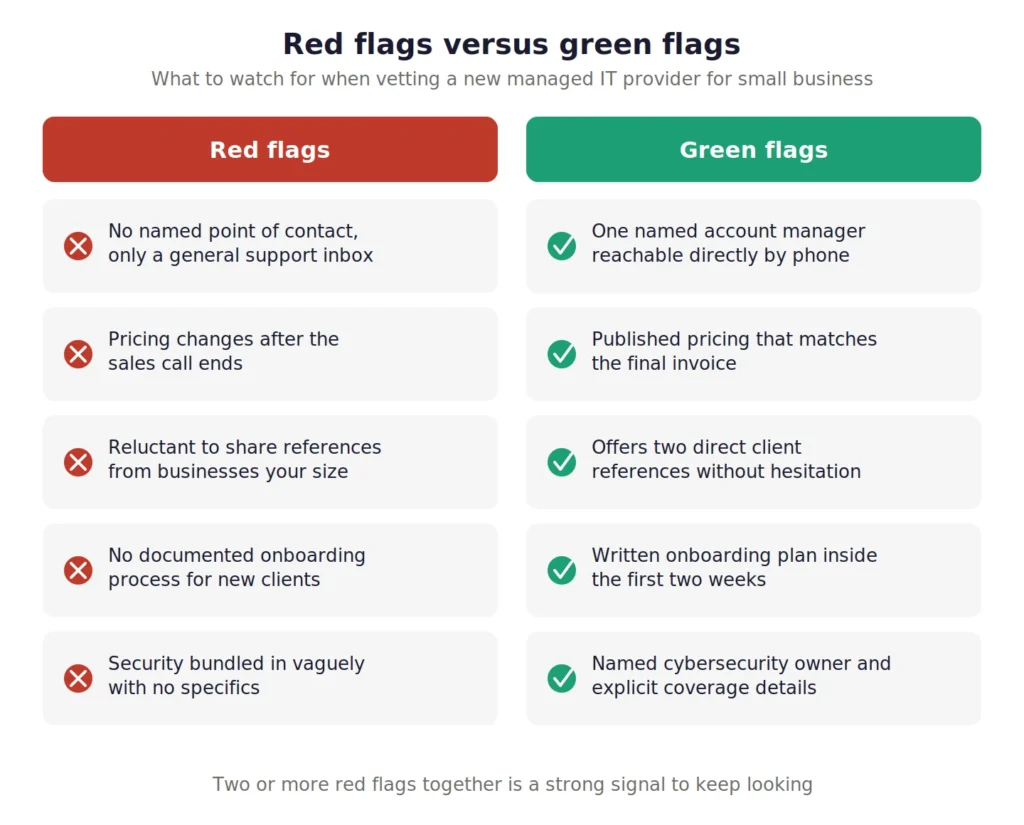
Watch for these patterns, since they show up in almost every “burned by my last provider” story:
- No named point of contact, only a general support inbox
- Pricing that changes after the sales call ends
- Reluctance to provide references from businesses your size
- No documented process for onboarding new devices or employees
- Security bundled in vaguely as “included” with no specifics on what that covers
- Contract terms that penalize you heavily for leaving early
None of these are dealbreakers in isolation, but two or more together is a strong signal to keep looking.
What OneClick’s Managed IT Services for Small Business Actually Include
Instead of asking you to trust another sales pitch, here is OneClick Technologies LLC’s actual pricing so you can compare it against any other small business IT services quote you receive.
| Plan | Price | What It Covers |
|---|---|---|
| Single Incident Support | Starting at $59.99 per incident | One-time fix for a specific issue, no contract required |
| 1 Year Support Plan | $219.99 per year ($24.99/month), $24.99 setup fee | Unlimited on-demand support, Monday through Friday, 9 AM to 6 PM EST, up to 5 devices |
| Business Support Plan | $49.99 per user, per month | Ongoing managed IT services for teams, minimum three users, one year term |
Every plan comes with a named support channel (live chat, email, and phone), so you are never routed to an anonymous queue. OneClick does not promise round-the-clock monitoring and says so upfront, because a provider that overpromises availability on the sales call is exactly the pattern that burned you the first time. If a competing managed IT provider for small business claims always-on coverage, ask them to put the exact staffed hours in writing before you compare it against this table.
Managed IT services cost varies widely, which is exactly why many small businesses get burned: a vague quote from a top managed IT services provider can look affordable until add-ons appear later. Whether you run one of the many small and mid-sized businesses in your area, a small and medium-sized team, or a solo operation focused on business growth, the right managed service provider should offer transparent managed IT solutions and managed cloud options that scale with your specific business rather than a one-size-fits-all package built for someone else’s small business needs.
Onboarding: What the First 30 Days Should Look Like
The first 30 days with a new managed IT provider should follow a written onboarding plan, not a wait-and-see approach.
- Device inventory completed and documented
- Network documentation created or updated
- Backup verification run and confirmed working, not assumed
- A named point of contact assigned to your account
- All of the above finished inside the first two weeks
A rushed onboarding is where managed IT services relationships go wrong before the contract has a chance to prove itself. If your last provider skipped straight to “we’ll reach out when something breaks,” that gap is why small issues turned into emergencies. Ask any new managed IT service candidate to walk through their onboarding checklist before you sign.
How to Test a New Provider Without Full Commitment
Test a new managed IT provider with a single, low-risk transaction before you sign another annual contract.
- Book a single incident first, whether that is virus and malware removal, a network cleanup, or a computer repair service visit
- Watch whether they hit the response time they promised
- Confirm the invoice matches the original quote, with no surprise line items
- For security concerns, ask how their cybersecurity services for small business would have prevented your last incident specifically
- If home network reliability was part of the complaint, check home network improvement approach to the same connectivity issues
- Browse the full IT support insights library to see if it covers the specific failure point that sent you looking for a new managed IT provider for small business
That single transaction reveals more about a service provider’s real behavior than any sales call.
Request a Side-by-Side Comparison Against Your Current Provider
Finding a Managed IT Provider You Won’t Have to Vet Again
It is important for small businesses of every size, from smaller businesses with a handful of employees to growing businesses adding headcount every quarter, to find a provider with services that align with their actual business environment. A reliable managed IT partner should offer expert support and professional services for businesses that expand as their business technology needs expand, not force small business IT support designed for someone else’s business data and specific business risks onto your team. If you are ready to outsource with confidence this time, OneClick Technologies LLC exists to help small businesses avoid repeating the same mistake, offering real support for small business owners who want a straight answer, not another sales pitch.
Being burned once does not mean you have to guess again. Talk to OneClick Technologies LLC about your specific last experience, and get a straight answer on response times, pricing, and security ownership before you sign anything.
Frequently Asked Questions
1) How long should I trial a managed IT provider before signing a long-term contract?
One resolved incident and one full month of standard tickets is usually enough to judge response time, communication, and invoice accuracy honestly.
2) What is the difference between managed IT services and on-demand support?
Managed IT services means ongoing monitoring and support under contract. On-demand or single-incident support means you pay per issue with no ongoing commitment, which is a lower-risk way to evaluate a new provider.
3) Should a small business IT services contract include cybersecurity by default?
Yes. Ask exactly what is covered, since “security included” without specifics is one of the most common red flags in a bad managed IT service for small business relationship.
4) What if my current provider refuses to release my data when I switch?
This should be spelled out in your exit terms before you ever sign. If it was not, request your data export in writing immediately and document the response.