Table of Contents
The benefits of managed IT services for small and medium-sized businesses go far beyond fixing broken computers. When an SMB partners with a managed service provider (MSP), it gains predictable IT costs, proactive security, cloud support, and certified expertise – without the overhead of a full-time in-house IT department. For most businesses with 5 to 200 employees, this single decision has a larger positive impact on daily operations than almost any other technology investment.
This guide covers what those benefits actually look like in practice, what managed IT costs, when your business should make the switch, and how needs differ depending on whether you are a 10-person startup or a 75-person established firm.
Key Takeaways
- Managed IT services cost 40–60% less than a comparable in-house IT hire for most SMBs under 30 employees.
- Cybersecurity, backup, and patch management should be included in the plan, not sold as add-ons.
- Medium-sized businesses benefit most from co-managed IT, where an MSP supports an existing internal IT person.
- Remote and hybrid teams need cloud application management, VPN support, and mobile device management – all covered under a managed IT plan.
- The clearest sign it is time to switch: your team is spending more time managing tech than running the business.
- OneClick Technologies LLC business plans start at $49.99 per user per month, with same-day remote support and no long-term contracts.
What Are Managed IT Services for Small and Medium-Sized Businesses?
Managed IT services are outsourced technology solutions where a managed service provider monitors, maintains, and supports a company’s entire IT infrastructure for a fixed monthly fee – replacing or supplementing an in-house IT department at a fraction of the cost.
Instead of waiting for something to break and then calling for help, an MSP monitors your systems continuously, applies security patches before vulnerabilities are exploited, and resolves early warning signs before they become outages. For small and medium-sized businesses without dedicated IT staff, this is the difference between technology that holds the business back and technology that helps it grow.
Core services covered under a managed IT plan typically include:
- Remote monitoring of all devices, servers, and network equipment
- Help desk support for day-to-day technical issues
- Cybersecurity management including endpoint protection and patch management
- Data backup with tested recovery procedures
- Cloud services management for Microsoft 365, Google Workspace, and business applications
- Network monitoring and performance reporting
For a deeper look at how the right IT service providers for small businesses compare to in-house IT and break-fix support, our dedicated guide covers each model side by side.
What Are the Core Benefits of Managed IT Services for SMBs?
The core benefits of managed IT services for small and medium-sized businesses are predictable costs, certified expertise on demand, proactive maintenance, multi-layer cybersecurity, scalable infrastructure, data backup, cloud management, compliance support, productivity gains for staff, and strategic IT planning – all delivered for a flat monthly fee that replaces unpredictable repair bills.
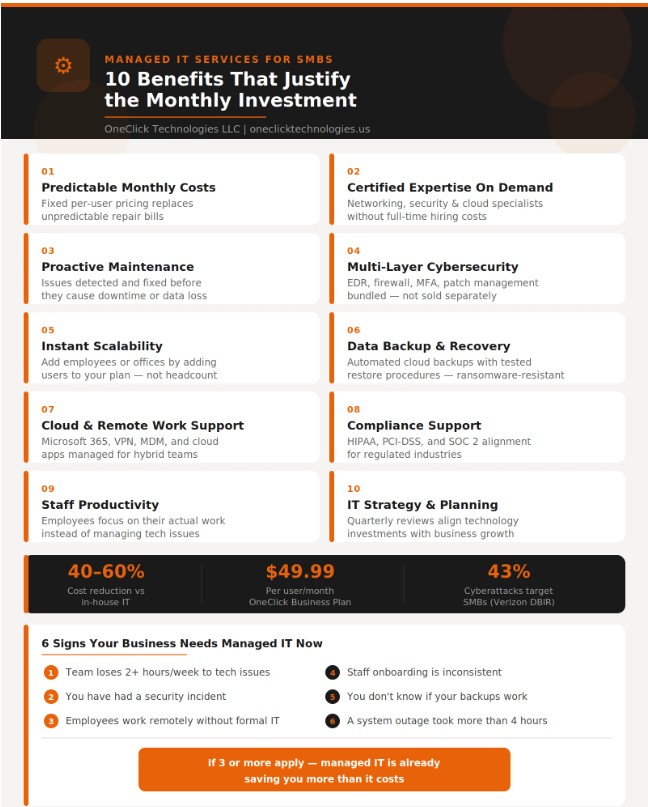
Here is what each benefit delivers in practice:
01 Predictable monthly costs – Fixed per-user pricing replaces emergency repair bills. You know your IT spend before the month starts.
02 Certified expertise – Access to networking, cybersecurity, and cloud specialists without hiring each as a full-time employee.
03 Proactive maintenance – RMM tools flag failing drives, slow networks, and failed backups before they cause downtime.
04 Multi-layer cybersecurity – Endpoint protection, managed firewall, patch management, and phishing defence included, not upsold.
05 Scalability – Adding employees or offices means adding users to your plan, not hiring new IT staff.
06 Data backup and recovery – Automated cloud backups with tested restore procedures protect against ransomware, hardware failure, and accidental deletion.
07 Cloud services management – Microsoft 365, Google Workspace, and cloud storage environments are configured, secured, and maintained.
08 Compliance support – HIPAA, PCI-DSS, and SOC 2 alignment for businesses in regulated industries.
09 Staff productivity – Employees stop losing hours to tech problems and focus entirely on their actual work.
10 IT strategy – Quarterly reviews align your technology decisions with business growth rather than reacting to breakdowns.
How Much Does Managed IT Support Cost for Small Businesses?
Managed IT services for small businesses typically cost $49 to $149 per user per month. A 10-person team pays $490 to $1,490 monthly – compared to $65,000 to $90,000 per year for a single in-house IT technician including salary, benefits, tools, and training. For most SMBs under 30 employees, managed IT costs 40 to 60 percent less than an equivalent in-house hire.
| Cost Factor | In-House IT | Managed IT (MSP) |
|---|---|---|
| Monthly base cost | $4,600–$7,500 | $490–$1,490 (10 users) |
| Cybersecurity tools | $200–$800 extra | Included |
| Data backup | $100–$300 extra | Included |
| Coverage | Business hours only | Automated monitoring + business-hours support |
| Expertise | One generalist | Team of specialists |
| Annual total (10 staff) | $65,000–$105,000 | $5,880–$17,880 |
The financial case moves from CapEx (large upfront infrastructure spend) to OpEx (predictable monthly cost), which simplifies budgeting and frees capital for growth. OneClick Technologies LLC’s Business Support Plan starts at $49.99 per user per month with a one-time $49.99 onboarding fee and no annual contract. See the full pricing breakdown.
How Do Managed IT Services Strengthen Cybersecurity for Small Businesses?
Managed IT services strengthen cybersecurity for SMBs by bundling endpoint detection and response (EDR), managed firewall, multi-factor authentication, security patch management, and email filtering into the monthly plan. This gives small businesses enterprise-grade protection without building a security team internally.
According to the Verizon Data Breach Investigations Report, 43 percent of cyberattacks target businesses with fewer than 250 employees. The most common cause: unpatched software. Automated patch management, included in every managed IT plan, eliminates the most frequent attack vector before it is ever exploited.
What a managed IT cybersecurity layer covers:
- Endpoint protection (EDR): Tools like Bitdefender GravityZone monitor every device in real time, not just during scheduled scans.
- Managed firewall: Intrusion prevention, application filtering, and regular rule reviews.
- Email security: Phishing and malicious attachment filtering before messages reach your team.
- MFA enforcement: Across Microsoft 365, Google Workspace, and remote access systems.
For businesses subject to compliance audits, your MSP documents security controls and generates audit-ready evidence of patch compliance and access management. Learn more about cybersecurity protection for small businesses and what a security incident actually costs.
How Do Managed IT Services Support Remote and Hybrid Teams?
Managed IT services support remote and hybrid teams by managing the cloud applications, VPNs, mobile devices, and secure access systems that distributed teams depend on daily. In 2026, this is one of the primary reasons SMBs engage an MSP – not just to fix laptops, but to keep a geographically spread team working securely and without friction.
A managed IT plan for a remote-first business covers:
- Microsoft 365 or Google Workspace management: user provisioning, licence allocation, security policy enforcement, and shared drive configuration.
- VPN and secure remote access: Encrypted connections for staff working from home, coworking spaces, or client sites.
- Mobile device management (MDM): Remote wipe, device encryption enforcement, and security policy compliance for all staff phones and tablets.
- Cloud application support: Onboarding new team members into SaaS tools with consistent security settings from day one.
For businesses that shifted to hybrid working and now manage a mix of office and remote staff, remote IT support for small businesses resolves most issues without a technician visit – saving time on both sides.
When Should a Small or Medium-Sized Business Switch to Managed IT Services?
A small or medium-sized business should switch to managed IT services when technology issues are recurring, downtime is affecting revenue, cybersecurity risk is increasing, or the team is scaling faster than informal IT arrangements can handle. These are the six clearest signals it is time to make the switch.
Six trigger signs your business needs managed IT:
- Your team spends more than 2 hours per week on tech issues – that is 100+ hours per year of lost productivity.
- You have experienced a security incident – a phishing attempt, ransomware warning, or data exposure, however minor.
- Employees work remotely and you have no formal system for device security or remote access.
- You are adding staff faster than your IT setup can absorb – onboarding is inconsistent and devices are configured differently for each new hire.
- You do not know whether your backups are working – or when they were last tested.
- A core system (email, file server, accounting software) went down and recovery took more than 4 hours.
If three or more of these apply, the cost of not acting is already higher than the cost of a managed IT plan.
Same-day remote support · No long-term contract · Business plans from $49.99/user/month
How Do Managed IT Needs Differ for Small vs. Medium-Sized Businesses?
Small businesses (1–25 employees) typically need a fully managed IT model where the MSP acts as their entire IT department. Medium-sized businesses (26–200 employees) usually need co-managed IT – where an MSP provides specialist depth and proactive monitoring alongside an internal IT coordinator. The distinction matters because the wrong model delivers either too much or too little support for the business stage.
Fully Managed IT for Small Businesses
For businesses with no internal IT resource, a fully managed plan covers everything: device setup, network management, security, backup, and help desk. The MSP is your IT department. This is the right model for most businesses under 25 employees.
Co-Managed IT for Medium-Sized Businesses
For businesses with an in-house IT coordinator or manager, co-managed IT is the smarter model. Your internal person handles day-to-day requests and knows the business well. The MSP provides specialist services they cannot deliver alone – advanced cybersecurity, compliance management, server infrastructure, disaster recovery planning, and after-hours monitoring. This hybrid model is the fastest-growing segment of the managed IT market because it gives medium-sized businesses the best of both worlds.
The split of responsibilities in a co-managed arrangement is documented upfront. Common divisions:
- Internal: Help desk, hardware procurement, user onboarding
- MSP: Security management, patch compliance, backup oversight, network monitoring, compliance reporting
Explore the full managed IT services guide for small businesses to understand how service tiers are structured for different team sizes.
What Should You Look for in a Managed IT Service Provider?
Choose a managed IT service provider based on six criteria: written response time SLA (under 1 hour for critical issues), transparent published pricing, bundled security, month-to-month contract flexibility, direct technician access, and demonstrated experience with businesses at your size. Any provider requiring a multi-year contract upfront without an exit clause should be avoided.
Key questions to ask before signing:
- What is your guaranteed response time for a business-critical issue during business hours?
- Is cybersecurity included or billed separately?
- Can I see a sample SLA before committing?
- What does off-boarding look like if I want to leave?
- When did you last test a data restore from one of your client’s backups?
For businesses evaluating multiple providers, our IT services for small business comparison guide covers how to assess each option against these criteria without relying on sales materials alone.
How Does OneClick Technologies LLC Deliver Managed IT for SMBs?
OneClick Technologies LLC is a U.S.-based managed IT service provider serving small businesses, startups, and SMEs from its base in Sheridan, Wyoming. The company operates Monday through Friday, 9 AM to 6 PM, with same-day remote response for business plan customers and direct technician access on every call – no ticket queues, no bots.
| What Is Included | Business Plan ($49.99/user/month) |
|---|---|
| Device monitoring | Automated monitoring with business-hours alerts |
| Help desk | Direct technician, same-day response |
| Cybersecurity | Endpoint protection + patch management |
| Data backup | Cloud backup monitoring + restore testing |
| Network health | Monthly reports + proactive alerts |
| Support channels | Remote / Chat / Phone / Virtual |
| Contract | Month-to-month, no annual lock-in |
| Setup fee | One-time $49.99 |
Single-incident support starts at $59.99 for businesses that need a one-time fix without a monthly plan. For home offices and small home users, the 1-Year Support Plan covers up to 5 devices for $219.99 with unlimited on-demand support. Learn more about professional IT support for home and business users and how each plan is structured.
Is Managed IT Services Right for Your Business?
The benefits of managed IT services for small and medium-sized businesses are clearest when you weigh the cost of prevention against the cost of recovery. A monthly managed IT investment is predictable, capped, and includes security and backup as standard. A single ransomware attack, extended outage, or data loss event is unpredictable, uncapped, and does not include those things.
If your business relies on technology to serve customers, process payments, or keep a team productive, managed IT is not a luxury. It is the infrastructure layer that makes everything else reliable.
Frequently Asked Questions
1) What is included in a managed IT service plan for small businesses?
A typical managed IT plan includes remote device monitoring, help desk access, cybersecurity (endpoint protection and patch management), cloud services management, data backup oversight, and network health reporting. Security should be bundled in the base price, not sold as an add-on. OneClick Technologies LLC’s Business Plan includes all of these from $49.99 per user per month.
2) Is managed IT worth it for a business with only 5 employees?
Yes, once a business handles customer data, processes payments, or depends on cloud tools for daily operations. At 5 employees, a single ransomware incident or data loss event costs far more than a year of managed IT. The break-even point is typically avoiding one major incident per year. If a data recovery situation has ever been needed, managed IT is already cost-justified.
3) What is the difference between fully managed IT and co-managed IT?
Fully managed IT means the MSP acts as the entire IT department. Co-managed IT means an MSP works alongside an internal IT coordinator, with each handling a defined set of responsibilities. Co-managed is most common in businesses with 25 to 200 employees that already have some internal IT capacity but need specialist depth in security, compliance, or infrastructure.
4) How long does managed IT service onboarding take?
Onboarding typically takes 1 to 3 business days for small businesses and 1 to 2 weeks for medium-sized firms with more complex infrastructure. The process includes a device and network audit, installation of monitoring software, backup and security configuration, and a kickoff call. OneClick Technologies LLC charges a one-time $49.99 setup fee covering the full onboarding process.