
Table of Contents
Key Takeaways
- Total fraud losses reported by adults 60 and older increased roughly fourfold from 2020 to 2024, reaching $2.4 billion, with tech support scams named as one of the leading categories.
- Technology adoption among seniors has grown substantially over the past decade, but a meaningful comfort gap remains that scammers actively exploit.
- Real tech companies never call unprompted to warn about a virus. Any call or pop-up claiming this should be treated as a scam by default.
- A consistent technician or small team, rather than rotating strangers, builds the trust that makes technology support actually work for seniors long-term.
- Reliable providers always communicate pricing before work begins, never mid-session or after.
- Automatic backups, two-factor authentication, and trusted contacts on financial accounts meaningfully reduce risk between support visits.
- Family involvement, whether joining a remote session or being present in person, is a sign of a trustworthy provider, not an inconvenience they resist.
OneClick Technologies LLC is worth knowing if you are searching for home tech support for seniors that is patient, affordable, and genuinely trustworthy. Whether you are helping a parent whose laptop suddenly will not connect to Wi-Fi, or you are a senior yourself trying to figure out why your tablet keeps freezing, finding the right kind of help matters more than most people realize until they have been burned by the wrong kind.
This guide walks through what reliable tech help for older adults actually looks like, the specific scams to watch for, and exactly what questions to ask before letting anyone, remote or in person, access a loved one’s computer.
Why Seniors Need a Different Kind of Tech Support Than Everyone Else
Seniors are not simply “less tech-savvy” versions of younger users. They face a specific combination of challenges: less familiarity with common software patterns, more caution around unfamiliar prompts, and unfortunately, a much higher risk of being targeted by scammers who impersonate tech support in the first place.
Pew Research Center data shows technology adoption among older adults has grown significantly over the past decade, but a meaningful gap remains between how seniors use devices and how younger generations do. That gap is exactly where confusion, frustration, and vulnerability tend to live. A senior who does not fully understand how a pop-up window works is far more likely to click something they should not, or to trust a phone call claiming to be from Microsoft.
This is why generic tech support, built for tech-comfortable users who just want the fastest fix, often fails seniors. What works instead is support built around patience: someone who explains what they are doing in plain language, moves at a comfortable pace, and does not make the person on the other end feel rushed or talked down to.
What Does Reliable Home Tech Support for Seniors Actually Include?
A genuinely reliable senior tech support service includes patient, step-by-step troubleshooting delivered by phone, virtual connection, or in person, covering everything from basic device confusion to virus removal, scam protection, and ongoing setup help, without pressuring the senior into unnecessary purchases or repeat visits.
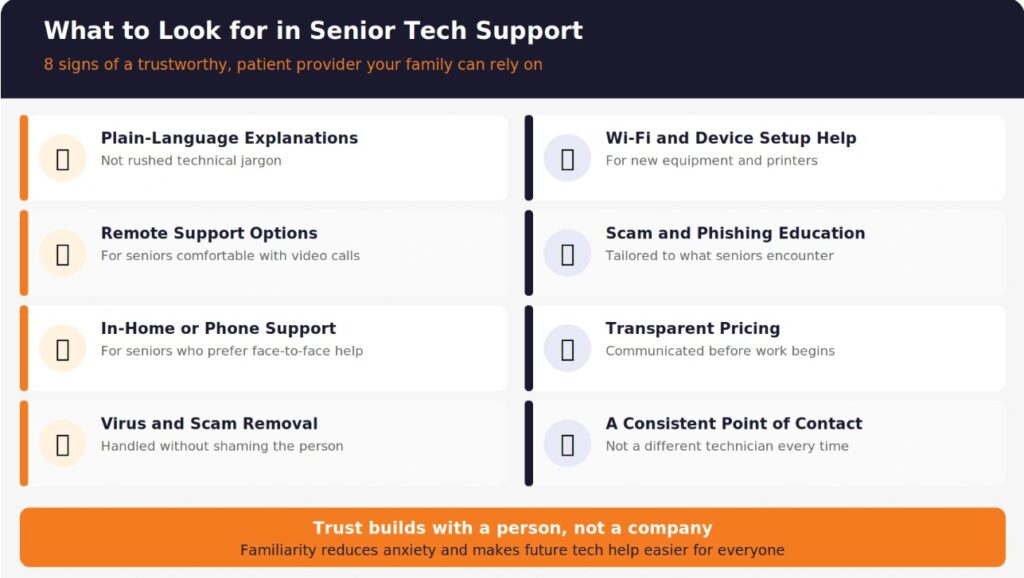
A genuinely reliable on-demand service should include:
- Patient, plain-language explanations, not rushed technical jargon
- Remote support options for seniors who are comfortable with video calls or screen sharing
- In-home or phone-based support for seniors who are not
- Virus, malware, and spyware removal handled without shaming the person for clicking something they should not have
- Wi-Fi, printer, and device setup help for new equipment
- Scam and phishing education tailored to what seniors specifically encounter
- Transparent, predictable pricing communicated before any work begins
- A named point of contact rather than a different rotating technician every time
The last point matters more than people expect. Seniors build trust with a person, not a company. A service where the same technician (or a small, consistent team) handles repeat visits builds familiarity that reduces anxiety around future tech problems.
How Much Does Affordable Senior Tech Support Cost?
Affordable pricing for senior tech help typically ranges based on whether the help is remote or in person, how complex the issue is, and whether it is a one-time fix or an ongoing support relationship. Rather than quoting figures that vary widely by region and provider, focus on transparency: any provider worth using should tell you the cost before starting work, not after.
What to look for in pricing structure:
| Pricing Model | What It Means | What to Ask |
|---|---|---|
| Flat per-session fee | One set price regardless of time spent | Is there a cap if the issue takes longer than expected? |
| Hourly billing | Charged by time, sometimes with a minimum | What is the minimum billable increment? |
| Monthly support plan | Ongoing access for a recurring fee | What is included, and what triggers an extra charge? |
| Free diagnostic, paid fix | No charge to identify the problem | Is the diagnostic genuinely free with no obligation? |
Affordable does not mean the cheapest number available. It means the price is proportionate to the actual work, clearly communicated, and free of pressure tactics. A tech support provider who cannot give a straightforward answer about cost before starting is not one your family should be working with.
Get Trusted Tech Help for Your Family Today
What Scams Should Families Watch for When Seeking Tech Support for Seniors?
This is the single most important section for any family researching senior tech support services, because the tech support space itself is one of the most common vectors scammers use to target older adults.
The FTC’s Protecting Older Consumers 2024-2025 report to Congress found that total fraud losses reported by adults 60 and older increased roughly fourfold from 2020 to 2024, reaching $2.4 billion in reported losses, with tech support scams named specifically as one of the leading fraud categories affecting this age group. That figure reflects only reported losses. Actual losses are believed to be significantly higher because many seniors do not report being scammed, often out of embarrassment.
How the Tech Support Scam Actually Works
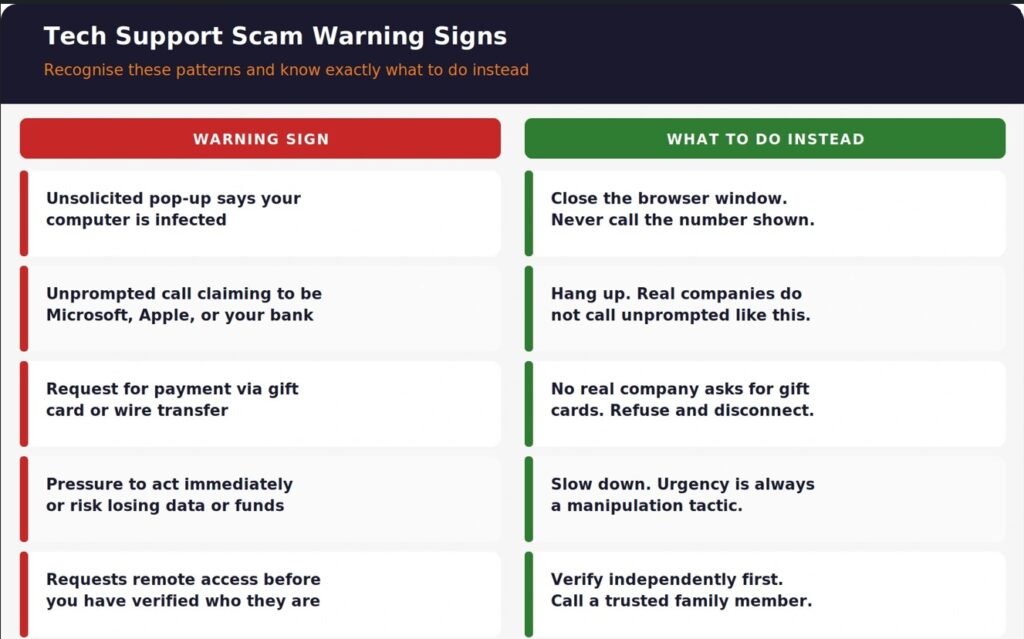
The pattern is consistent enough to recognise: a pop-up appears on the screen claiming the computer is infected, often with a loud warning sound and a phone number to call “Microsoft support” or “Apple support” immediately. The number connects to a scammer, not a real company. The scammer then either requests remote access to install malware, asks for a payment via gift card or wire transfer, or both.
Real signs of a tech support scam:
- Unsolicited pop-ups claiming your computer is infected, with a phone number to call
- Any caller claiming to be from Microsoft, Apple, Amazon, or your internet provider who contacted you first
- Requests for payment via gift cards, wire transfer, or cryptocurrency
- Pressure to act immediately or risk losing your data or accounts
- Requests for remote access before you have verified who they actually are
Real tech companies do not call you unprompted about a virus on your computer. Neither Microsoft nor Apple monitors individual home computers and calls owners directly. If a senior in your family receives a call or pop-up like this, the correct response is to hang up or close the browser window, not to engage further.
For families who want deeper context on how these threats operate technically, the guide on virus and malware removal and how infections actually spread explains what a real infection looks like compared to a fake scare pop-up.
Get older adults technology services or Get a Second Opinion
Remote vs In-Home Tech Support: Which Is Right for the Senior in Your Life?
The right format depends entirely on the individual senior’s comfort level with technology and how serious the issue is. Neither option is universally better.
| Factor | Remote Support | In-Home Support |
|---|---|---|
| Best for | Seniors comfortable with video calls or basic screen sharing | Seniors who prefer face-to-face help |
| Typical response time | Often same day | Depends on scheduling availability |
| Cost | Generally lower | Generally higher due to travel |
| Hardware issues | Cannot fix physical damage | Can address hardware directly |
| Comfort level required | Moderate, needs basic screen-sharing setup | None, works for any comfort level |
| Family can observe | Yes, if joining the call | Yes, if present during the visit |
A practical approach many families use: start with a phone call to understand the issue, then decide together whether remote access makes sense or whether an in-person visit is the more comfortable choice. The key is that the senior, not just the adult child arranging the help, feels comfortable with the format chosen. Forcing a reluctant senior into a remote session they do not trust can create more anxiety than the original tech problem.
Detailed context on how a proper remote session actually works, including exactly what a senior will see and control throughout, is covered in how remote PC repair and tech support sessions work, which is worth reviewing together with the senior before the first session so nothing feels unfamiliar.
What Questions Should You Ask Before Choosing a Tech Support Provider for a Senior Family Member?
Before committing to any provider, ask these questions directly. A trustworthy provider answers all of them clearly and without hesitation.
1. Will the same technician or a small, consistent team handle repeat visits? Familiarity reduces anxiety for seniors significantly. A rotating cast of unfamiliar technicians undermines the trust that makes tech support actually work for this audience.
2. What is the exact cost before any work begins? No provider should start work, then reveal the price. Ask for this in writing if the engagement is ongoing.
3. How do you explain what you are doing during the session? Look for providers who narrate their work in plain language rather than working silently and handing back a “fixed” device with no explanation.
4. Can a family member be present or on the call during remote sessions? Any legitimate provider welcomes this. Reluctance to have a family member present is a red flag.
5. What happens if the senior accidentally grants access to a scammer, and how would your service differ from that? This question specifically tests whether the provider understands the scam landscape their own industry created and can clearly explain how their process protects against it.
6. Do you offer any kind of follow-up support if the same issue happens again? A provider confident in their work usually offers some form of follow-up guarantee. One who avoids the question may not stand fully behind their fix.
How to Protect a Senior’s Devices Between Support Visits
Good tech support for seniors is not just reactive. Ongoing device health matters as much as fixing the problem in front of you.
Practical steps that reduce future tech emergencies:
- Set up automatic backups. If a device fails or is compromised, photos, documents, and account information should not disappear with it. Understanding how computer backup services actually protect data is worth reviewing so the senior understands what is happening in the background without needing to manage it manually.
- Enable two-factor authentication where possible. This single step blocks a large share of account takeover attempts, even if a password is compromised.
- Set up a trusted contact for financial accounts. Many banks and brokerages allow a designated trusted contact who can be reached if suspicious activity is detected. This is separate from account access, and it adds a layer of protection specifically for exploitation attempts.
- Review account security warnings together periodically. A senior receiving a security warning about unfamiliar account access may not know whether it is legitimate or a phishing attempt. Reviewing these together, even briefly, builds the pattern recognition that prevents future confusion.
- Keep home Wi-Fi and network equipment updated. Outdated routers are a common, overlooked vulnerability. A home network improvement review covers what most households, senior-occupied or not, tend to overlook.
None of these steps require the senior to become a technology expert. They require a support relationship where someone trustworthy checks in periodically, rather than only appearing after something has already gone wrong.
Set Up Ongoing Protection for a Senior’s Devices Now!
Finding Help Your Family Can Actually Trust
The tech support space is unfortunately full of both good providers and predatory scammers wearing the same language. Knowing what real, reliable support looks like, and what red flags to walk away from, is the difference between solving a problem and creating a much bigger one.
OneClick Technologies LLC provides patient, transparent home tech support for seniors and their families, whether the issue is a confusing pop-up, a slow computer, a Wi-Fi setup, or ongoing peace of mind that someone trustworthy is one call away. The team explains every step clearly, welcomes family involvement, and never pressures anyone into unnecessary purchases or repeat visits.
Review what home IT services are available or explore pricing options built for real households to see what dependable, affordable support actually looks like.
Frequently Asked Questions
1) What is home tech support for seniors?
It is technical assistance, delivered remotely, by phone, or in person, that is specifically designed around the pace, comfort level, and communication style older adults need. It typically covers device troubleshooting, virus removal, Wi-Fi and printer setup, and scam protection education, delivered with more patience and plain-language explanation than standard tech support aimed at younger, more tech-comfortable users.
2) How do I know if a tech support call to my parent is a real company or a scam?
Legitimate technology companies do not proactively call customers about a virus detected on their computer. If your parent receives an unsolicited call or a pop-up with a phone number claiming their device is infected, that is very likely a scam. The safest response is to hang up, close the browser, and independently contact a trusted, verified tech support provider rather than calling any number provided in the alert itself.
3) Is remote tech support safe for seniors who are not comfortable with technology?
Yes, when the provider is legitimate and the senior understands what remote access means before the session starts. A trustworthy provider explains the process clearly, allows a family member to be present, and never asks the senior to grant access before establishing who they are and why. If a senior is uncomfortable with the concept entirely, in-home support is a reasonable and equally valid alternative.
4) What should I do if my senior parent already gave a scammer remote access to their computer?
Disconnect the internet connection immediately by turning off Wi-Fi or unplugging the router. Change passwords for financial accounts and email from a different, uncompromised device. Contact the bank if any financial information was shared. Then have a trusted technician examine the device for installed malware before reconnecting it to the internet. Identity theft protection guidance covers the additional steps worth taking if personal information may have been exposed during the incident.
5) How often should a senior’s computer or tablet be checked by a professional?
There is no universal answer, but a periodic check every few months, even when nothing seems wrong, catches small issues before they become larger ones. This is particularly useful for seniors who may not notice early warning signs like slowing performance or unusual pop-ups until the problem is already significant.
6) What is the difference between affordable and cheap when it comes to senior tech support?
Affordable means the price is fair and proportionate to real, transparent work. Cheap often means corners are cut: rushed explanations, upsells added mid-session, or a provider who disappears after the first visit with no follow-up. The best home tech support services for seniors are priced clearly upfront and do not rely on repeat emergencies to generate revenue.